
Cloud costs are rising faster than most organizations planned for. Overprovisioned storage and idle compute instances, combined with unnecessary environments, inflate monthly bills without delivering additional value. Meanwhile, IT teams are managing increasingly complex stacks filled with overlapping tools, disconnected systems, and redundant functionality that create more overhead than they eliminate.
Many enterprises are responding by reevaluating their digital architecture. A headless content management system (CMS) helps reduce IT overhead by consolidating tools, automating workflows, simplifying infrastructure, and eliminating the dependencies that drive up long-term costs.
Why IT Cost Reduction Matters
IT teams are being asked to support more digital experiences, including web, mobile, and omnichannel, without proportional budget increases. The exception is to scale output while keeping costs the same. That’s a difficult position to be in, and, unfortunately, it’s becoming the norm.
Economic uncertainty has made return on investment (ROI) and measurable cost control a priority across every department, not just IT. Leadership teams are scrutinizing technology investments more carefully, and systems that can’t demonstrate clear efficiency gains are harder to justify when it’s time to renew them.
Several forces are compounding the pressure:
Content delivery demands are increasing: Teams publish more campaigns, updates, and personalized experiences than ever. The systems supporting them need to scale without adding administrative complexity.
Development teams face pressure to ship faster: They still must maintain security and performance, which is impossible when custom integrations and aging platforms hold their infrastructure together.
Omnichannel delivery requirements are expanding: Every new channel and touchpoint, whether apps, portals, kiosks, or e-commerce websites, adds infrastructure, integration, and maintenance costs. That is, unless the underlying architecture is built to handle it.
Traditional frameworks struggle to keep pace with these demands. They require more maintenance, more custom integration, and more manual oversight as they scale. All that increases long-term costs without improving outcomes.
What Drives High IT Costs?
Most IT cost problems don’t appear as a single line item on a month-end budget report. Rather, they spread across infrastructure, licensing, development, and labor. Drivers of high IT costs include:
Legacy Systems
Traditional CMS platforms require ongoing maintenance and security patching, which both require specialized developer expertise. Over time, teams spend more resources keeping the platform running than delivering new functionality or improving customer experiences.
Overprovisioned Cloud Infrastructure
Cloud flexibility becomes expensive without active management. Unused environments, oversized compute instances, and redundant storage accumulate month after month, especially in multi-environment settings where dev and staging resources stay active long after they’re needed.
Licensing Bloat
Enterprises often run separate tools for content management, digital asset management (DAM), analytics, personalization, and workflow. As that stack grows, vendor contracts, renewal negotiations, and training requirements multiply. Often, these tools have overlapping capabilities.
Custom Integrations and Technical Debt
Disconnected systems require custom integrations to share data and support workflows. Those integrations solve short-term problems, but they also create long-term maintenance burdens. Every system upgrade requires coordination between multiple teams and systems. As a result, development cycles slow down as teams spend more time troubleshooting glue code than building a new product.
Manual Workflows
Manual publishing, approvals, and content distribution consume time across marketing, development, and content teams. As volume increases, these processes slow teams down and become a ceiling on how fast the organization can move and adapt.
Vendor Lock-In
Proprietary systems make data migration difficult and migrations expensive. Organizations end up dependent on specific vendors, which weakens negotiating leverage at renewal. This dependency also limits the ability for an organization to adopt better-fit tools as its needs evolve.
Top IT Cost Reduction Strategies
You don’t have to cut capabilities to achieve sustainable cost reduction. As a Digital Transformation Lead for a global company put it: “The most effective IT cost reduction strategies don’t just cut spending—they eliminate inefficiencies. Organizations that consolidate platforms and adopt flexible architectures can reduce costs while improving performance and scalability.” These strategies address the root causes of IT overhead and help teams work at their full capacity:
Consolidate Your Tech Stack
Fragmented digital ecosystems built around disconnected point solutions are expensive to run and slow to change. By replacing multiple tools with a unified platform, you can reduce overhead across licensing, vendor management, content strategy, and day-to-day operations. To do so, you should:
Replace separate CMS, DAM, and personalization tools with a single platform to eliminate redundant functionality and the licensing costs that come with it.
Cut vendor management overhead, which results in fewer contracts to negotiate, fewer renewals to track, and fewer support relationships to maintain.
Reduce integration complexity by using a platform with built-in capabilities instead of building and maintaining connections between third-party tools.
Improve content and asset consistency by centralizing management in one system rather than syncing across siloed platforms.
Lower training and onboarding costs by standardizing tools across departments.
By consolidating your tech stack, you can reduce total spend. However, you can also reduce the time it takes teams to coordinate with each other every week.
Move to a Headless CMS Architecture
A headless CMS solution decouples the front end (content presentation layer) from the back-end (content management). That separation gives teams greater flexibility, faster development cycles, and lower long-term infrastructure costs. It also results in a multi-channel content repository.
Content is now reusable. Teams can create it once and deliver it across various platforms, including websites, mobile apps, portals, kiosks, smart devices, and Internet of Things (IoT) devices through a single application programming interface (API). Additionally, development teams can update and build custom frontend user experiences they prefer to work with, such as WordPress, independently of what the content team prefers. This removes bottlenecks and shortens release cycles and time-to-market.
When demand grows, headless CMS platforms scale without replatforming. You can create new digital experiences for end users without replacing backend infrastructure. This future-proofs your existing investment and eliminates the migration costs that traditional upgrades require. Maintenance and scalability are also simpler. Modular systems are easier to update, patch, and extend than tightly coupled monolithic platforms.
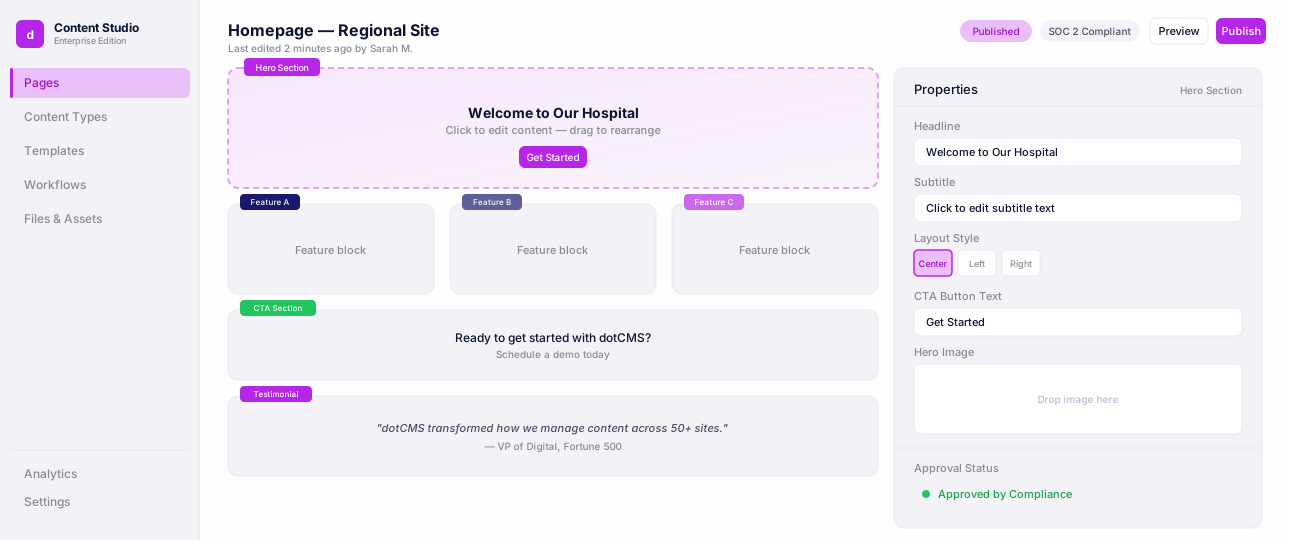
dotCMS is a visual headless platform built for compliance-led industries. Developers get full API-first flexibility. Content teams get visual editing, drag-and-drop components, and real-time preview. You don’t have to choose one at the expense of the other.
Complete dotCMS Platform Tour
See how content moves from creation to delivery with content modeling, visual editing, workflows, and APIs.
Optimize Cloud and Hosting Usage
Cloud infrastructure is only cost-effective when it’s actively managed. Without regular audits and monitoring, waste accumulates quickly. Be sure to:
Audit and eliminate idle resources: Get rid of inactive environments, redundant storage, and oversized compute instances that run without justification.
Implement autoscaling: This should match capacity with real-time demand, so you’re not paying for peak provisioning during off-peak hours.
Use cost monitoring tools: Track spend trends and surface inefficiencies before they escalate.
Consolidate fragmented hosting environments: This reduces administrative overhead and simplifies billing.
Choose deployment models: Choose cloud, hybrid, or on-prem based on cost efficiency and business requirements, not vendor defaults.
dotCMS supports cloud, hybrid, and on-premises deployment. Our Cloud Anywhere platform gives your teams the flexibility to align their infrastructure decisions with actual cost targets.
Automate Content and Workflow Management
Manual processes are expensive at scale. As content volume increases, approval bottlenecks, formatting tasks, and distribution workflows consume a growing share of your team’s bandwidth. This introduces more room for error. To prevent errors, you should:
Automate publishing, approvals, and content updates with pre-approved templates to reduce manual intervention and the errors that come with high-volume operations.
Define clear workflows for marketing, development, and content creation teams to eliminate handoff delays and duplicate effort, which streamlines workflows.
Automate repetitive tasks, such as formatting, metadata tagging for SEO, asset management, and distribution, so content creators can focus on their creative work.
Strengthen content governance with automated approval chains and audit trails that document every content decision without adding administrative overhead.
dotCMS includes multi-step workflows, permissions, and approval tools built directly into our platform. Compliance teams can enforce structured review processes and enhanced security upfront without adding extra software.
Workflows & Approvals
See content move through review, legal, and compliance approvals with full audit trails.
Reduce Vendor Lock-In
Vendor lock-in adds costs slowly over time. These costs show up in limited negotiating leverage, expensive migrations, and architectural decisions made to accommodate a service provider rather than your business needs. You should:
Prioritize open API-driven platforms with flexible deployment options, so your architecture stays under your full control.
Avoid proprietary systems that make data portability difficult or migration prohibitively expensive.
Ensure interoperability with your existing tools so that a new platform extends your stack rather than forcing replacements.
Negotiate contracts with exit flexibility in mind. Long-term commitments without clear off-ramps often become the most expensive line item when your priorities shift.
dotCMS is an open-source headless CMS, with GraphQL and REST APIs that connect to the tools and plugins you already use. That seamless integration means less dependency on any single vendor. Our flexible pricing gives you more room to build architecture that fits your organization long-term.
Ready to Optimize Your IT Spend?
Reducing IT costs is about removing the waste, complexity, and lock-in that prevent teams from working efficiently. Legacy systems, fragmented tools, manual workflows, and overprovisioned infrastructure all create overhead that slows content delivery and inflates long-term costs.
dotCMS gives enterprise teams the agility and adaptability to consolidate tools, support headless delivery, automate content operations, and choose infrastructure that matches actual business needs, all from a single platform built for scale. See how we can help reduce your IT costs and request a demo today.
FAQ: How to Reduce Your IT Costs
FAQ
Some of the most effective strategies include consolidating technology platforms, optimizing cloud infrastructure, automating workflows, reducing vendor lock-in, and adopting scalable headless architecture.
Support teams can reduce costs by eliminating redundant tools, automating repetitive tasks, improving workflow efficiency, and using unified platforms that centralize functionality without increasing complexity.
A headless CMS system reduces costs by improving scalability, simplifying integration, enabling content reuse across channels, accelerating development workflows, and reducing reliance on expensive monolithic systems.
dotCMS helps enterprises reduce IT overhead by consolidating digital capabilities into a flexible platform. Our API-first approach supports scalable headless architecture, enables workflow automation, and reduces infrastructure and maintenance complexity across digital content ecosystems.