
Cloud Anywhere
Your cloud account. Our operations team.
dotCMS Cloud Anywhere is a fully managed dotCMS running on your own cloud account i.e., AWS, Azure or GCP. You keep ownership of the infrastructure. We keep it running.

What is Cloud Anywhere?
The best of both worlds
Cloud Anywhere is a customer-owned dotCMS installation, fully managed by dotCMS experts.
It runs on dotCMS Cloud's battle-tested, certified stack and is deployed in the region you choose, on the cloud provider you already trust. You contract directly with your cloud vendor and retain full control of your sub-account, your data, and your billing.
dotCMS engineers handle everything else: deployment, monitoring, upgrades, patching, backups, and support.
Backed by the same proven operational model, security controls, and SOC 2 Type II and ISO 27001-aligned practices that power dotCMS Cloud — all running in your own infrastructure.
Why Cloud Anywhere
Why teams choose Cloud Anywhere
You stay in control.
Your cloud account, your security policies, your data. Define your own perimeter, ingress, logging, and retention. You can even remove dotCMS access if you ever need to.
We handle the heavy lifting.
99.95% uptime SLA, 24/7 monitoring, dotCMS upgrades, security patches, bug fixes, and backup and recovery — all managed by dotCMS experts who know the platform inside out.
Built on a proven stack.
Cloud Anywhere runs on the same architecture trusted across dotCMS Cloud. No experiments, no guesswork — just an optimized configuration refined across years of production deployments.
Flexible by design.
Custom sizing, scaling, security, and retention to fit your requirements. Layer in your own cloud cost-savings programs, reserved instances, and prepaid plans — and we'll consult with you to optimize spend.
Run dotCMS in your own cloud account without having to manage it yourself.
Cloud Anywhere runs on an autoscaling Kubernetes cluster with hardened nodes, deployed inside your sub-account. Licensing is included in your Cloud Anywhere subscription.

Managed infrastructure
Load balancing, WAF, certificate management, and DNS, all handled for you.
Infrastructure as Code
GitOps-driven deployments for consistency and repeatability.
Smart scaling
Spot.io manages node groups and right-sizing for cost efficiency; shared database, search, and file storage scale up or down across all your environments.
Secure access
StrongDM controls cluster access, Calico isolates environments, Linkerd handles mTLS, and secrets stay locked down in a managed secrets store.
Full observability
Centralized logging and monitoring so issues get caught before you feel them.
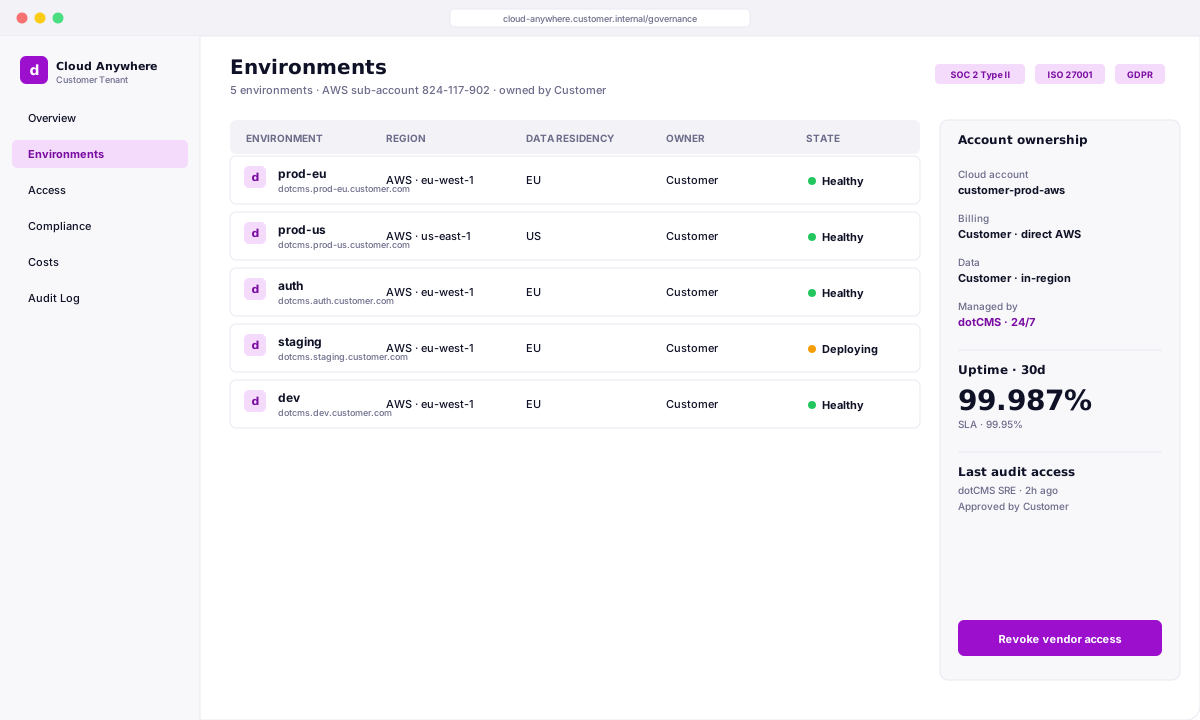
For organizations that need to keep infrastructure under their own roof.
Cloud Anywhere is for organizations that must own the cloud account — for policy, compliance, geography, or billing — but don't want the cost and headcount of running dotCMS themselves.
Instead of standing up a platform team, carrying 24/7 on-call, and managing upgrades and spend, you get all of that handled for a predictable subscription. You keep control of the infrastructure; we make it cheaper and safer to operate than doing it yourself.
FAQ
Frequently asked questions
Which cloud providers are supported?
Which cloud providers are supported?
AWS, Azure, and GCP. You pick the provider and region; we deploy and manage dotCMS there.
Do I get all the Enterprise features?
Do I get all the Enterprise features?
Yes. Cloud Anywhere supports all core dotCMS Enterprise capabilities, with certain region-specific services available where supported by the underlying cloud provider and geography.
What access does dotCMS need?
What access does dotCMS need?
Cloud Anywhere runs in a sub-account on your cloud provider, where dotCMS needs admin access to manage the environment. You retain control of that sub-account and your data at all times.
What does dotCMS manage?
What does dotCMS manage?
We manage the hosting and support of your dotCMS application — upgrades, monitoring, backups, and maintenance. You keep ownership of any other applications, including those that integrate with dotCMS.
How many environments do I need?
How many environments do I need?
Following best practice for any production publishing architecture, a minimum of three (for example: dev / auth / prod).
Is it customized for us?
Is it customized for us?
Your publishing architecture is tailored to your needs — but it's always built on dotCMS's certified stack, so you get customization without the risk.