
Moving off a CMS used to be one of the riskiest projects a platform team could take on. Months of discovery, a pile of undocumented templates nobody fully understood anymore, and a launch date that kept slipping because every week uncovered another edge case nobody had mapped. That risk profile is changing. AI-assisted tooling doesn't remove the work of a migration, but it collapses the slowest, most error-prone part of it: figuring out what the current system actually does before you can safely replace it.
This post covers both sides of that shift: the tools and methods that make AI-assisted migrations faster today, and a real, step-by-step walkthrough of what that looks like in practice.
Why migrations stall
Ask any architect who has run a CMS migration and the stall points are usually the same:
Tribal knowledge: The person who wrote the original templates left two years ago. The logic they wrote is the only documentation that ever existed.
Hidden branching: A template that looks like it does one simple thing turns out to handle three different cases depending on conditions nobody wrote down.
Fear of breaking content editors: Editors are used to clicking into a page and changing it. A new architecture that takes that away is a non-starter, whatever the technical upside.
Unknown scope: Nobody knows how many templates, widgets, or content types are actually in play until someone counts them, and that counting used to take days.
None of these are specifically AI problems. They're the reason CMS migrations have historically taken quarters instead of weeks.
What AI actually changes
AI-assisted migration tools are good at exactly the tasks that used to eat the most calendar time:
Fast inventory: Instead of manually walking a legacy template tree, an AI assistant can index hundreds of files in an afternoon and produce a searchable map of what backs each page. On one recent migration, that meant a working index across roughly 470 legacy template and script files, done in a single pass instead of a week of manual tracing.
Pattern translation at scale: Converting one template from an old templating language into a modern component is a known, repeatable transformation. AI tools are well suited to doing that conversion consistently across dozens of pages, instead of a developer reinventing the pattern each time.
Asset migration, mapped automatically: Matching images to the right content item used to mean manually cross-referencing each one by hand. AI can now trace which images belong to which content items, migrate the assets, and reconnect them to the right item automatically, turning a tedious manual pass into a scripted step.
Faster root-cause work: When something breaks, like a schema mismatch or a broken query, an AI assistant can trace the failure back to its source far faster than manual log-reading, because it can hold the whole codebase in view at once.
Surfacing what's actually unclear: This might be the most underrated benefit. AI is honest about tracing failures. When a piece of legacy logic genuinely can't be explained from the code alone, a good AI-assisted pass will say so instead of guessing, which forces the right conversation with stakeholders early instead of shipping a guess.
None of this replaces engineering judgment. Architecture decisions, security tradeoffs, and how content should be modeled going forward still need a human making the call. What AI changes is how fast you get to the point of making that call.
What an AI-assisted migration to dotCMS looks like
The walkthrough below draws on a real project: migrating a legacy, server-rendered dotCMS site built on Velocity templates to a modern headless architecture with Next.js, while keeping the visual editor intact for content editors. The starting platform here happened to be an older dotCMS deployment, but the pattern is the same whether you're leaving Contentful, Adobe Experience Manager, WordPress, or a homegrown CMS: you're always translating templates and a content model from one system into another, and that's exactly where AI earns its credits. Moving from another vendor adds a few steps a same-platform move can skip, like auditing and physically moving content, protecting search rankings, and planning the cutover. Those are included below so the full sequence is in one place.
Before you start: connect your AI assistant to dotCMS
Install the dotCMS MCP server in your AI coding tool so the assistant can read and change your dotCMS content types and content directly. Running npx dotcms agent setup handles it in one step: it creates an API token, points the server at your dotCMS instance, and adds it to Claude Code, Cursor, VS Code, and other common editors. If you set it up by hand, you supply your instance URL and an API token with write access to content types, content, and workflows. Connect it to a staging or development instance during the migration, not production.
Discovery
1. Inventory before you touch anything.
Before any conversion work started, an AI assistant walked the entire legacy template tree and built an index of every file: what page it belonged to, what it depended on. That index became the map the whole team worked from, instead of everyone independently re-discovering the same files.
2. Audit the inventory and decide what not to migrate.
An inventory tells you what exists. An audit tells you what's worth keeping. Most legacy sites carry years of outdated pages, duplicate content, and templates nothing uses anymore. AI can do the first sort quickly by grouping content by last-updated date, near-duplicates, and missing owners. Paired with your analytics, that sort shows which pages actually get visited. The keep, merge, or retire call still belongs to the content owners. But every page you retire here is a page you don't have to model, convert, move, or redirect later, so this step reduces the work in every step after it.
Design
3. Model the content in dotCMS first.
Conversion needs a destination. Before templates are rebuilt or content is moved, the content types, fields, and relationships have to exist in dotCMS. Using the inventory and audit, AI can draft a proposed model: which legacy structures map to which content types, which fields carry over, and where the old system mixed content and layout in ways the new model should pull apart. Your team reviews and approves the model. Since the template conversion and the content move both build on it, it pays to get it right before either starts.
4. Set ground rules before generating code.
Three rules governed every AI-assisted conversion pass on this project:
Convert one-to-one before improving anything.
Keep the existing visual styling framework instead of introducing a new one mid-migration.
Build shared site chrome (header, footer, navigation) before any individual page, since pages built on unstable chrome have to be redone later.
Rules like these matter more with AI in the loop, not less, because they're what keeps fast output from turning into fast rework.
Build
5. Let AI trace tangled logic before you commit to a rebuild plan.
One page's listing logic looked simple from the outside but turned out to route through several layers of indirection that even the client's own team hadn't fully mapped. An AI-assisted trace surfaced that the logic was genuinely ambiguous, with more than one plausible interpretation that would produce different results. That's a finding instead of a failure: it meant pausing that one page for a real decision instead of shipping a guess that editors and developers would quietly disagree about later.
6. Flag platform-side blockers early.
Some content in the legacy system was structured in a way no headless front end could cleanly read; one template file was doing double duty as both a detail view and a full listing page depending on the request. That's not something code conversion fixes. It needed a content-modeling decision from the client's team, documented and handed off explicitly rather than worked around with a hack that would need to be undone later. A good model up front reduces these surprises, but it won't eliminate them. Expect to revisit the model from step 3 at least once.
7. Catch integration breaks fast.
At one point, the GraphQL layer connecting the new front end to the CMS broke outright. Because the AI assistant could trace the failure across the full codebase at once, the root cause was found and fixed the same day, instead of becoming a multi-day debugging detour.
Move
8. Move the content.
With the model in place, the content itself can move. In dotCMS, that usually means the Content Import API, which loads content from CSV into a specific content type and can validate a file before anything is written. AI is useful in two places here. It can write the scripts that pull content out of the old system and reshape it to fit the new fields. It can also trace which images and files belong to which content items. Upload those assets first, so imported content points to files that already exist. Related content needs the same care: import the items other content depends on first, and keep a map of old IDs to new dotCMS identifiers so relationships connect correctly. Run a small batch, check it, then scale up.
9. Protect your search rankings.
A migration that changes URLs without redirects will lose traffic, often quietly and for months. Every legacy URL that's being kept needs a home in the new site, and every URL that changes needs a 301 redirect. dotCMS handles these through Vanity URLs, which can redirect single pages or whole folders with a pattern. AI can build the old-to-new URL map from the inventory and the audit, flag pages that lost their title or meta description along the way, and check for broken internal links before launch. Retired pages from step 2 need a decision too: redirect them to the closest relevant page or let them return a 404 on purpose.
Launch
10. Keep humans reviewing every diff, and put editors in the visual editor.
Every AI-generated change went through the same review process a human-written change would. Nothing shipped unreviewed, and the ground rules from step 4 doubled as a checklist for what "done right" meant on each page. Code review only covers half of it, though.
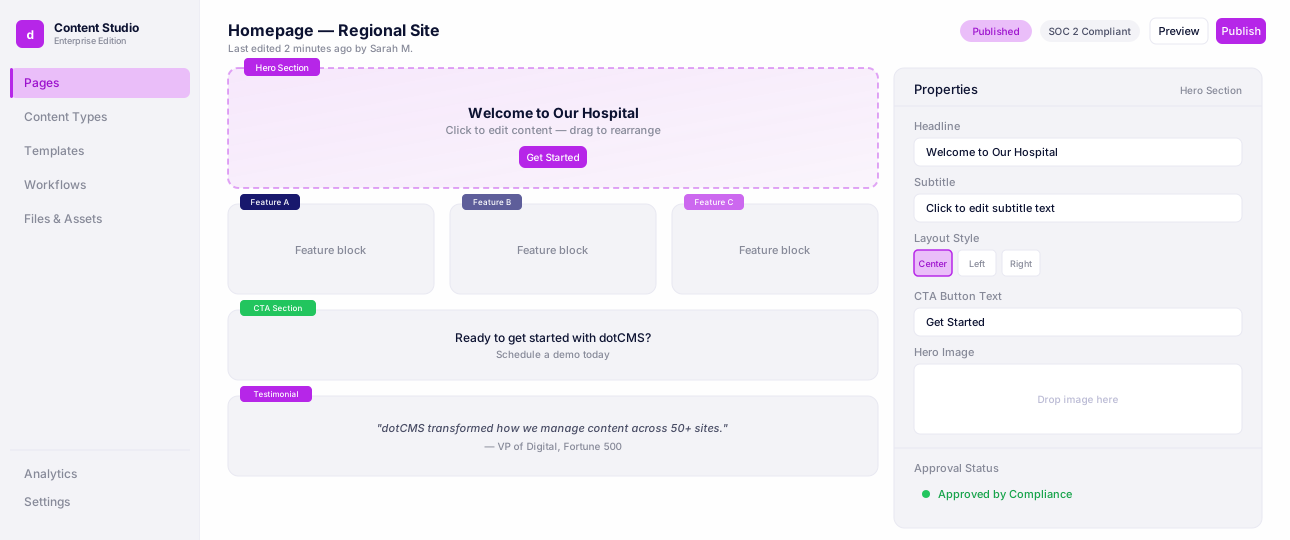
Content editors should work in the visual editor before launch: open pages, change content, add and rearrange components, and check that the editing experience they depend on still works. Editor sign-off belongs in the definition of done alongside code review, since editors are the people a migration most often lets down.
Universal Visual Editor
Edit pages visually while developers keep full headless control.
11. Plan the cutover.
Decide early whether you're launching all at once or in phases by section, site, or brand. Phased launches lower the risk but mean running two systems longer; a single cutover is cleaner but leaves less room for error. Either way, settle three things before launch day: a content freeze window so nothing is edited in the old system after the final move, a rollback plan if something critical breaks, and editor training so the team can publish on day one without filing support tickets.
How much faster is this, really?
The honest answer: the parts of a migration that involve real decisions (how content should be modeled, what the new architecture should look like, which risks are worth taking) still take real time and real judgment. What compresses is discovery. Work that used to mean days of manually reading legacy templates to understand what they do now takes hours, and it comes with documentation attached instead of living only in one developer's head. That shift alone is often the difference between a migration that gets greenlit and one that stays a 'someday' project.
If your team has been putting off a CMS migration because nobody could say how long discovery would take, that reason no longer holds. Not knowing what you're dealing with used to be the bottleneck. It isn't anymore.
You don't have to do this alone
If a DIY migration isn't the right fit for your team's bandwidth, dotCMS's professional services group and delivery partners run these same AI-assisted discovery and conversion practices on customer migrations from Contentful, Adobe, WordPress, and other platforms. The tools and methods above are the same ones used on paid engagements; the difference is who's driving.
FAQ
Faster Migration to dotCMS with AI
It depends on how many templates and content types you have and how much of the content model needs rethinking. Decisions about modeling, architecture, and risk still take real time. The part AI shortens is discovery: reading legacy templates to understand what they do can drop from days to hours, and you get documentation out of it.
Yes. dotCMS Professional Services offers migration services that help with planning and running a move to dotCMS, whether you're new to the platform or consolidating several sites into one instance. dotCMS also works with solution partners, including agencies that specialize in CMS and content migrations. Teams that want to run the migration themselves can use the dotCMS MCP server and the Content Import API.
AI speeds up inventory, converting templates to a repeatable pattern, mapping assets to content items, writing import scripts, and tracing broken queries back to the cause. People still decide how content is modeled, what the architecture looks like, and which security tradeoffs to accept. People also review every AI-generated change before it ships.
Use the Content Import API. It loads CSV files into a content type, and a validate endpoint checks the data before anything is imported. Upload images first and reference them by their Site Browser path. If a CSV row includes a dotCMS identifier that already exists, that content is updated instead of duplicated.
Give every URL that changes a 301 redirect. dotCMS handles redirects with Vanity URLs, which can redirect a single page or use a regular expression to redirect a whole folder. Before launch, check for missing titles, missing meta descriptions, and broken internal links.
Yes. The Universal Visual Editor works on headless front ends. Editors can edit inline, drag components from the Content Palette into containers, and reorder them. Make editor sign-off part of launch alongside code review.