
Quick Answer: Enterprise CMS ROI is calculated by comparing total financial return against total cost of ownership. The practical formula is: CMS ROI = (productivity gains + revenue impact + risk reduction - TCO) / TCO x 100. For enterprise teams, the strongest CMS ROI models include three return categories - productivity, revenue, and risk reduction - and five TCO categories: licensing, implementation, integration maintenance, operations, and adoption.
Enterprise CMS decisions are rarely made on features alone. Once a CMS selection moves from evaluation to budget approval, the question changes: what is the platform worth over three to five years?
Many organizations calculate CMS ROI too narrowly by comparing the new license fee against the previous platform license fee. That misses the larger business case. A CMS can reduce developer dependency, speed up campaign launches, improve content reuse, reduce operational risk, and consolidate multiple sites or brands into a more governable platform.
This framework is designed for enterprise CMS business cases where the platform must support content operations, governance, integration, and measurable digital performance. For background on ROI modeling, see the EnterpriseCMS.org ROI calculation guide and Brightfind's CMS ROI guide.
At a Glance
CMS ROI should measure productivity gains, revenue impact, and risk reduction against total cost of ownership.
License cost is only one part of TCO. Implementation, integrations, support, hosting, retraining, and governance overhead also affect ROI.
Content teams can produce measurable ROI when a CMS reduces developer dependency for routine updates.
Governance ROI is real but should be modeled carefully as avoided risk, not guaranteed savings.
dotCMS case studies support specific ROI inputs: Estes reported a 58% drop in internal service tickets, and a global financial institution achieved 10x performance gains after modernizing with dotCMS.
The most defensible CMS business case uses baseline metrics before migration and tracks the same metrics after launch.
The CMS ROI Formula
A simple CMS ROI formula is useful for budget conversations, but it must be fed with realistic inputs.
CMS ROI = (Total Return - Total Cost of Ownership) / Total Cost of Ownership x 100
For enterprise CMS projects, total return should include productivity gains, revenue impact, and risk reduction. Total cost of ownership should include licensing, implementation, integration maintenance, operations, support, and adoption costs.
The core inputs
Productivity gains: time saved by content, marketing, developer, compliance, and operations teams.
Revenue impact: incremental revenue from faster launches, better localization, improved performance, conversion gains, or campaign velocity.
Risk reduction: lower expected cost from compliance issues, publishing errors, security gaps, audit failures, or manual governance processes.
TCO: all platform, people, implementation, integration, hosting, maintenance, support, and training costs over the ROI period.
Recommended calculation period
Use a three- to five-year model. Year one is usually affected by implementation and adoption costs. Years two and three often show the clearer operating return because the platform is live, teams have adopted the workflow, and content velocity can be measured against the baseline.
The Three Return Categories in CMS ROI
1. Productivity Gains
Productivity gains are the easiest CMS return category to quantify. They measure how much less effort is required to create, review, approve, publish, update, localize, and reuse content.
Common productivity gains include:
Reduced developer time for routine content updates.
Reduced time-to-publish for editorial and marketing teams.
Fewer manual governance processes, such as email approval chains or spreadsheet tracking.
Fewer internal service tickets tied to page edits, campaign updates, or CMS maintenance.
Faster reuse of structured content across sites, brands, channels, and languages.
For example, the Estes case study reports that dotCMS helped reduce the number of internal service tickets by 58%. That is a stronger ROI input than a generic efficiency claim because it can be mapped to support hours, developer capacity, and operational cost avoided.
Estes
How Estes Trucking Express Lines Empowered Marketers and Reduced IT Burden
Read the case study →Teams should also evaluate whether the CMS supports structured content and reusable content modeling. Structured content can reduce duplication by allowing the same content object to be reused across multiple pages, front ends, and channels.
2. Revenue Impact
Revenue impact captures the value created when the CMS helps teams launch, test, optimize, and localize digital experiences faster.
Revenue impact can come from:
Faster campaign launches.
More frequent content testing and optimization.
Improved site performance and user experience.
Faster localization for new regions or audience segments.
Better content reuse across brands, product lines, and digital channels.
Revenue gains are harder to attribute directly to a CMS than productivity gains, so the model should start with baseline metrics. Measure the average time from campaign brief to live page before migration. Then measure the same metric after launch. Apply a revenue value only where there is a clear connection to campaign contribution, conversion lift, or opportunity acceleration.
If the CMS supports modern delivery patterns such as headless CMS architecture, hybrid CMS delivery, or frontend as a service, revenue-impact modeling should also include speed, reuse, and front-end flexibility.
3. Risk Reduction
Risk reduction is often omitted from CMS ROI calculations because it measures avoided cost rather than visible revenue. For compliance-led organizations, that omission can materially understate the CMS business case.
Governance risk can include:
Unapproved content reaching production.
Missing or incomplete audit evidence.
Inability to prove who changed, reviewed, approved, or published content.
Security or access-control gaps caused by poorly governed publishing workflows.
Regulatory exposure from inaccurate disclosures, expired content, or inconsistent localized content.
IBM's Cost of a Data Breach Report 2025 reports a global average data breach cost of USD 4.44 million. That figure should not be treated as a guaranteed CMS savings number, but it is a useful reference point for modeling why governance, access control, auditability, and security evidence matter in enterprise technology decisions.
For CMS risk modeling, connect the risk category to platform capabilities such as workflows and approvals, role-based permissions, audit trails, version history, and security and compliance controls.
The CMS TCO Framework
TCO is the denominator in the ROI calculation. A complete CMS TCO model should include five cost categories.
1. Licensing
Licensing includes the annual platform subscription, SaaS fee, support contract, and any platform add-ons. For usage-based platforms, the model should also account for how cost changes as sites, requests, users, storage, content types, bandwidth, or environments scale.
The dotCMS pricing page positions pricing around scale and deployment choice. In ROI models, this should be treated as a contract-specific input: validate site count, capacity assumptions, support level, environments, and expected growth over the full calculation period.
2. Implementation
Implementation includes discovery, architecture, setup, migration, content modeling, design system integration, front-end development, QA, launch planning, and cutover. For large enterprise migrations, implementation is often the largest year-one cost.
Do not treat implementation as a sunk cost outside the model. Spread it across the full ROI window so budget owners can see when the migration pays back.
3. Integration Maintenance
Integration maintenance includes ongoing work across CRM, DAM, analytics, personalization, marketing automation, identity, search, translation, commerce, and data platforms. It also includes API updates, connector upgrades, testing, and regression management.
This is where architecture matters. Platforms with stable APIs, clean extension patterns, and clear plugin architecture can lower ongoing change costs. Teams should also account for adjacent systems such as digital asset management, search, analytics, and front-end deployment pipelines.
4. Operations and Support
Operations and support include hosting, monitoring, security patching, platform administration, incident response, backups, performance tuning, and infrastructure management. For on-premise or self-hosted deployments, these costs sit more heavily with the enterprise. For managed cloud and SaaS deployments, some operational cost shifts to the vendor.
For teams evaluating deployment and operational cost, include DevOps requirements in the model. Factors such as environments, CI/CD, infrastructure support, release processes, and managed operations can materially affect TCO. See dotCMS DevOps resources for related platform considerations.
5. Retraining and Adoption
Retraining and adoption costs include training content authors, developers, reviewers, legal teams, compliance stakeholders, and administrators. This is usually a year-one cost, but slow adoption can delay ROI into year two.
A CMS with a strong authoring experience can reduce adoption cost because non-technical users need less support to perform routine updates. Training plans should still include governance, workflow, publishing, localization, and escalation processes.
CMS ROI by Platform Type
ROI varies by CMS architecture. The table below is a planning framework, not a fixed ranking. Actual ROI depends on implementation quality, content operations maturity, and governance requirements.
Platform Type | Typical Implementation | Annual Ops Cost | Governance Depth | Time-to-Publish |
|---|---|---|---|---|
Legacy enterprise CMS | Often longer because templates, workflows, and integrations are highly customized | Often high if upgrades and maintenance require specialist support | Can be strong, but often depends on configuration and services | Often slower when changes queue through development teams |
Pure headless CMS | Often faster for developer-led launches | Moderate, depending on API, preview, and integration requirements | Varies; governance depth should be validated by plan and implementation | Fast for developer-managed sites, slower for non-technical teams without visual editing |
Visual headless CMS | Moderate; depends on front-end integration and content model complexity | Moderate to lower when editors can self-serve routine changes | Strong when workflows, permissions, version history, and audit trails are native | Fast when developers, editors, and reviewers can work in one governed process |
Open-source self-hosted CMS | Highly variable; depends on internal engineering maturity | Can be high because infrastructure, security, upgrades, and plugins remain internal responsibilities | Varies by configuration, plugins, and operating model | Varies widely by implementation |
For a broader platform selection view, see the enterprise CMS platforms guide and the dotCMS guide comparing traditional CMS, headless CMS, and hybrid CMS.
How dotCMS Produces Measurable CMS ROI
dotCMS ROI is strongest when the organization needs both modern content delivery and governed content operations. The platform combines visual editing, headless delivery, multi-site management, workflows, permissions, and deployment flexibility in one CMS environment.
Operational efficiency
In the Estes case study, dotCMS helped the marketing team make updates without relying on a developer queue and reduced internal service tickets by 58%. For ROI modeling, this can be converted into reduced support hours, lower development interruption, and faster campaign execution.
Performance and consolidation
In the financial services case study, a global financial institution achieved 10x performance gains after modernizing with dotCMS Managed Cloud. The same case study also highlights multi-site management, compliance-ready governance, and reduced infrastructure overhead as part of the modernization outcome.
Governance and compliance
dotCMS Workflows & Approvals support review checkpoints, approval routing, and logged workflow actions. The Security & Compliance page documents controls and certifications including SOC 2 Type II, ISO 27001:2022, and TX-RAMP Level II. In an ROI model, these capabilities support risk reduction, audit readiness, and lower manual evidence-gathering effort.
Multi-site and multi-brand efficiency
For enterprises managing multiple brands, regions, or business units, centralizing content operations can reduce duplicated content models, inconsistent workflows, and platform sprawl. Related internal resources include what is a multi-tenant CMS, managing multiple websites from a single platform, and multi-brand strategy guidance.
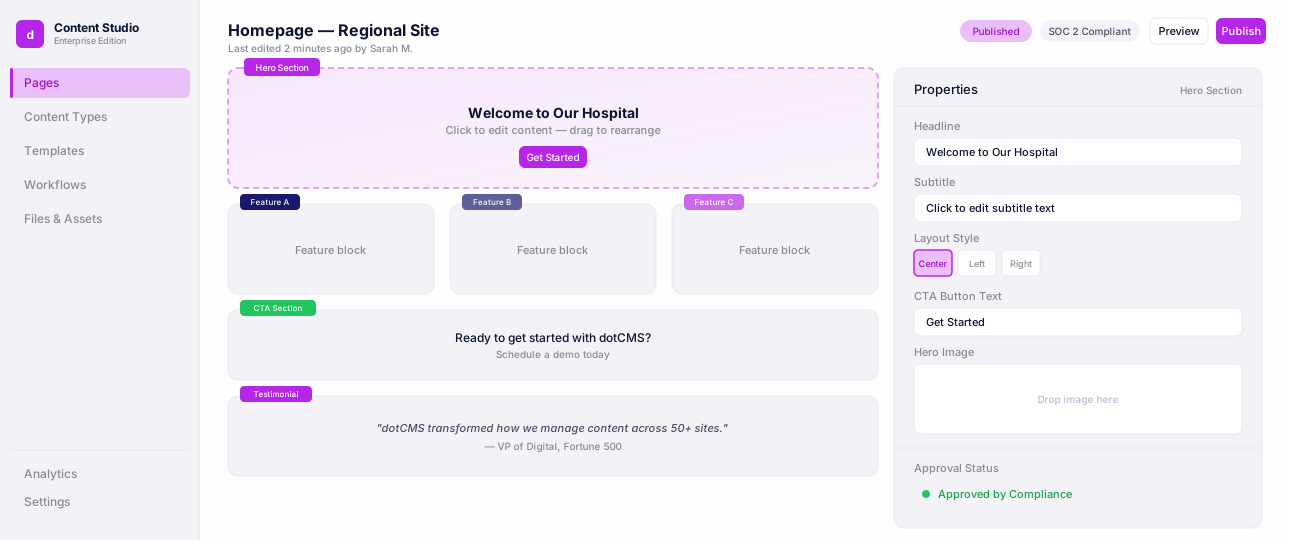
Multisite Management
See how teams manage dozens of websites, brands, and regional experiences from a single dotCMS instance.
Headless delivery with visual control
dotCMS supports headless CMS delivery while preserving visual editing for content teams. This matters because ROI is weakened when developer flexibility comes at the cost of editor dependency. For background, see what is headless CMS and headless CMS vs hybrid CMS.
Video: dotCMS Demonstration Video - product walkthrough for evaluators building a CMS business case.
CMS ROI Calculation Example
Use this simplified example to structure the business case. Replace each number with your organization-specific baseline and forecast.
Productivity gains: Developer and content team time saved from fewer routine content tickets, faster publishing, and fewer manual approval steps.
Revenue impact: Incremental value from faster campaigns, better localization, improved site performance, and shorter launch cycles.
Risk reduction: Expected reduction in cost exposure from stronger approval workflows, access control, audit evidence, and content governance.
TCO: License, implementation, integrations, operations, support, hosting, retraining, and adoption costs across three to five years.
Then calculate:
CMS ROI = (productivity gains + revenue impact + risk reduction - TCO) / TCO x 100
The model becomes more credible when every number is tied to a baseline metric: current time-to-publish, current number of developer tickets, current audit-preparation hours, current campaign launch time, current infrastructure cost, and current platform maintenance cost.
Conclusion
Enterprise CMS ROI is measurable when the model looks beyond license cost. A defensible CMS business case should measure productivity, revenue impact, and risk reduction against the full cost of ownership. That means including implementation, integration, maintenance, operations, support, retraining, and adoption alongside the platform fee.
The strongest ROI cases start with baseline metrics before migration and continue tracking the same metrics after go-live. Without that baseline, ROI becomes a narrative. With it, CMS modernization becomes a measurable business case.
Explore how dotCMS delivers measurable ROI for compliance-led organizations: Enterprise case studies and dotCMS pricing.
FAQ
Most organizations can begin measuring productivity gains within 6-12 months of go-live, assuming baseline metrics were captured before migration. Risk reduction begins once governed workflows, permissions, and audit trails are live in production. Revenue impact usually becomes clearer after the second or third campaign cycle, once teams have enough post-launch performance data to compare against the pre-migration baseline.
Start with the number of content updates, page changes, campaign edits, localization tasks, and publishing requests that required developer or administrator support before migration. Multiply the number of tasks by the average time per task and average hourly cost of the people involved. Then measure the same workflow after migration. The time and cost difference becomes the productivity return.
Governance risk reduction should be modeled as expected avoided cost, not guaranteed savings. Identify the risks the CMS helps reduce, such as unapproved publishing, missing audit evidence, access-control gaps, expired content, or regulatory review delays. Estimate the probability and impact of each risk before and after implementation. The difference becomes the risk-reduction value. External benchmarks like IBM's Cost of a Data Breach Report can support the risk discussion, but organization-specific assumptions should drive the final number.
Not necessarily. Open-source CMS platforms can reduce license cost, but they often shift cost into hosting, security patching, upgrades, plugin maintenance, developer overhead, and compliance configuration. For compliance-led enterprises, a commercial platform with native governance and managed support can have a lower three- to five-year TCO than a self-managed open-source deployment.
Track time-to-publish, developer hours spent on content-related tickets, number of publishing requests, approval-cycle length, audit-preparation time, content reuse rate, site performance, Core Web Vitals, campaign launch time, localization turnaround, and compliance issues identified before and after migration. These metrics map directly to productivity gains, revenue impact, and risk reduction.
Resources
Internal