
Modern e-commerce teams manage more than products. They manage content, campaigns, landing pages, and customer journeys, often across multiple channels at once. That is a hard problem to solve with a traditional, tightly coupled platform.
A headless content management system (CMS) solves it by decoupling the backend content layer from the frontend presentation layer. Teams can manage everything in one place and deliver it anywhere, including websites, apps, kiosks, and digital signage, via application programming interfaces (APIs). The result is a faster time-to-market and richer shopping experiences because of a content infrastructure that can keep up with commerce demands.
This guide covers what makes a headless CMS a strong fit for e-commerce. It also discusses how dotCMS integrates with platforms like Shopify and how it compares to other leading options in 2026.
Why Businesses Need a CMS Platform for E-Commerce
A commerce platform — Shopify or otherwise — is built to run products, inventory, pricing, and checkout. It isn't built to run marketing, and that's not a knock on the platform; it's a division of labor most e-commerce teams feel the edges of long before they can name what's missing.
Without a CMS layer on top of the commerce engine, that shows up as the same handful of recurring problems:
Every content change — a new landing page, a footer link, a homepage banner — becomes a developer ticket, because commerce platforms aren't built for a marketer to author pages independently.
Pages get built and published blind, with no way to preview how they'll actually look until they're already live.
Marketing wants to feature a product in a seasonal collection — a “Sale” tab, a holiday landing page — and can't, without reworking the commerce platform's own category structure, which is built for inventory logic, not campaigns.
A campaign form needs to route leads somewhere the commerce engine has no reason to know about, like a CRM, which means custom development work for something that isn't really a commerce problem.
The fix isn't replacing the commerce platform — it's pairing it with a system built for the other half of the job. The commerce platform stays the system of record for product, inventory, and transactions. The CMS becomes the system of record for content, campaigns, and page composition, and the two connect through structured data rather than duplicated content.
What Is Headless E-Commerce Platform?
Headless commerce separates the frontend customer experience from the backend commerce engine. The product catalog, product information, cart, and checkout logic all live in the backend. The storefront or online store, which is what customers see and interact with, is built and managed independently via APIs.
This means content, products, and checkout flows can be updated separately without touching each other. Marketing teams can launch new landing pages and campaigns without waiting for developers or IT to make backend changes. Likewise, developers can build or rebuild the frontend without disrupting commerce operations.
Headless E-Commerce vs. Traditional E-Commerce
Traditional e-commerce means a tightly coupled platform where the storefront, CMS, and commerce engine are bundled together. While that works on a smaller scale, it creates limitations as businesses grow. In a traditional setup:
A frontend redesign often requires backend changes and extended development cycles.
Content and product data are rigidly tied to templates, which limits flexibility for marketers.
Adding new channels, such as a mobile app, social media, kiosk, or Internet of Things (IoT) connected device, means duplicating or heavily reworking the existing stack.
In a headless setup, those constraints go away. The frontend framework can be rebuilt or updated independently. Content and product data are managed through a central API layer and delivered to any channel or touchpoint. Teams move faster, and the architecture stays cleaner as the business scales.
What Actually Makes the Best E-Commerce Headless CMS?
Not every headless CMS is built for commerce. The best platforms have the following capabilities:
Content and commerce integration: Without it, marketers can only add static copy around product data by asking a developer to hand-build a one-off template each time. The best platforms let a landing page, buying guide, or campaign page pull live product and collection data in directly, with no engineering work required per page.
Multi-channel delivery: One backend that delivers content and product data to websites, mobile apps, and other digital touchpoints simultaneously, so a new channel doesn't mean rebuilding the content layer from scratch.
Ease of use for marketers: Without it, a homepage banner or seasonal landing page sits in a developer queue behind everything else IT is already working on, and pages get built and published blind, with no way to preview how they'll look until they're live.
The dotCMS Content Style Editor is a strong example of closing that gap. It lets content teams customize component styling directly, without opening a developer ticket, for teams building on the dotCMS SDK.
The Universal Visual Editor also shows changes in real time as you make them — the same editing experience whether the front end is traditionally rendered or a headless React/Vue app — so marketers aren't stuck guessing how a change will render before it's published.
Scalability: The ability to manage multiple brands, regions, currencies, and storefronts from a single platform instance, rather than standing up a new site — and a new budget, build, and security review — every time the business adds one.
Integration flexibility: Seamless, pre-built connections to commerce platforms like Shopify, plus open APIs to pull product and catalog data from the systems that already run the business — ERP, PIM, or a backend like SAP — so storefront content stays in sync with the source of truth instead of being duplicated and manually maintained.
Plan and preview future changes. E-commerce content is seasonal — sales, promotions, holiday merchandising. dotCMS's Time Machine lets teams schedule content to auto-publish and expire on a future date, and preview exactly how the site will look on that date before it goes live, so a Black Friday banner or a back-to-school promotion can be built, reviewed, and queued up in advance instead of manually flipped live.
Teams usually hit these limitations well before they can name them: needing a developer to add a product to a seasonal “Sale” collection because the commerce platform's category structure won't allow it without a rebuild, or waiting on IT to update a homepage banner because content and code are wired into the same template.
How the CMS performs in the real world is also important. These two case studies reveal the importance of choosing the right system:
One of the top-selling furniture retailers in the U.S., CITY Furniture, replaced its monolithic legacy system with a headless solution on dotCMS to grow online revenue and market share. In less than 12 months, they saw an increase in revenue of 150%.
City Furniture
How CITY Furniture Increased Return on Investment by Replatforming to dotCMS
Read the case study →Similarly, Jostens, the memorabilia brand, rebuilt its site on dotCMS with implementation partner CapTech. Their old tech stack was composed of custom, Java-based web pages, a legacy CMS, and an outdated interface running on on-premises hosting. They needed a website that was fast and efficient and could handle rich imagery, while being able to deliver content to mobile devices. Using dotCMS, Jostens got a single platform that simplified content creation, page building, and image management, while supporting both traditionally rendered and fully headless delivery for the pages that needed it — and stood up to significant peak-time traffic without slowdowns.
Jostens
How Jostens Went from Legacy to Hybrid Headless with dotCMS
Read the case study →Top 6 Best Headless CMS for E-Commerce
The right digital e-commerce solution depends on your team's technical resources, use cases, and commerce complexity. You also need to choose a platform that gives you enough flexibility for your marketing and development team. Some of the leading providers for 2026 include:
1. dotCMS
dotCMS is an API-first headless CMS built for enterprise teams managing complex, multi-channel digital experiences. For e-commerce, it's particularly strong when teams need to combine editorial content with live commerce data and need marketers and developers working efficiently on the same platform.
Key capabilities for e-commerce include:
API-first architecture with REST and GraphQL support
Native Shopify integration via plugin, allowing you to query products and collections directly within dotCMS templates and thumbnail syncing
Universal Visual Editor (UVE) for marketer-led page building on a headless frontend, requiring no developer involvement for product landing pages
Content Style Editor, so you can style components without code — live today for teams building on the dotCMS SDK, with native-rendering support rolling out next
Multi-tenant architecture to run multiple storefronts and brands from one instance
Usage dashboard for capacity planning across storefronts that scale seasonally
Flexible deployment via on-premises, in the cloud, or the fully managed Cloud Anywhere
Experiments lets marketers run A/B tests on layouts, copy, images, and CTAs, tied to real goals — clicks, time on page, conversion, revenue — and promote the winning version straight to production as part of the normal publishing workflow, not a bolted-on separate tool.
Time Machine lets teams schedule content to auto-publish and expire on a future date, and preview exactly how the site will look on that date before it goes live.
In 2025, dotCMS was named a Major Player in the IDC MarketScape: Worldwide AI-Enabled Headless CMS 2025 Vendor Assessment. It's a strong choice for brands that need editorial and commerce capabilities unified on one platform, without vendor lock-in.
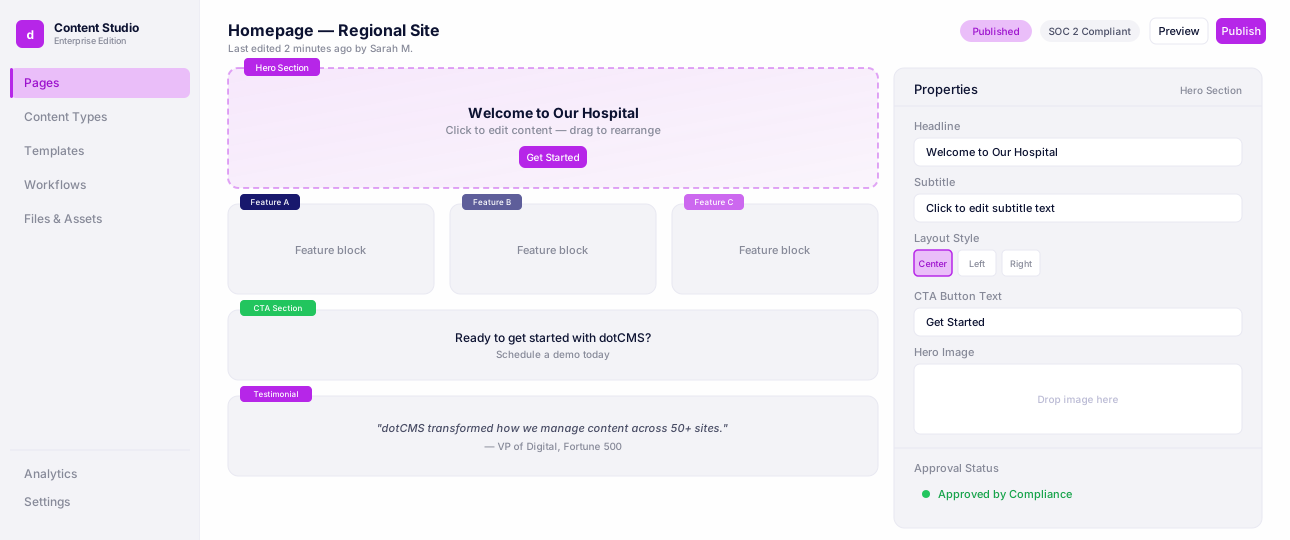
Complete dotCMS Platform Tour
See how content moves from creation to delivery with content modeling, visual editing, workflows, and APIs.
2. Contentful
Contentful is a API-first CMS. It uses software development kits (SDKs) and has structured content modeling and localization support. It's widely adopted in enterprise environments and integrates with most major commerce platforms and product information management (PIM) systems.
The trade-off is developer dependency. Contentful is not built with marketers in mind for everyday authoring, and most commerce configurations require significant development investment upfront. Pricing scales with API calls and usage, which can become expensive at high content volume.
3. Sanity
Sanity offers real-time collaboration, a customizable content studio, and GROQ, which is its own query language for flexible data fetching. It's popular for customized storefronts where developers need fine-grained schema control.
The platform is used by teams with strong engineering resources who want maximum flexibility in content modeling. It's less ideal for teams that need marketers to work independently, as most customization requires developer configuration.
4. Strapi
Strapi is an open-source, self-hosted CMS with REST and GraphQL API support. It gives development teams control over the platform and its data.
The trade-off is infrastructure ownership. Strapi requires setup, hosting, and ongoing maintenance. It's suitable for teams with dedicated engineering capacity who want to avoid Software as a Service (SaaS) licensing costs and prefer to own their stack.
5. Storyblok
Storyblok is built around visual editing and marketer-friendly workflows. Its component-based content structure works well for commerce landing pages, promotions, and campaign content.
It's for teams that want headless delivery with a visual CMS interface, which reduces the gap between editorial teams and frontend output. It's good fit for brands that prioritize publishing speed and campaign flexibility without heavy developer involvement on routine updates.
6. Hygraph
Hygraph is a GraphQL-first CMS designed for schema-driven, structured content experiences. Its flexible content modeling and federation capabilities make it a strong fit for developers building complex, API-driven commerce architecture.
Additionally, it's for teams building highly structured omnichannel delivery pipelines who want maximum query control. Hygraph is less than ideal for marketers who need intuitive authoring tools without technical support.
How to Set Up dotCMS with Shopify
The dotCMS Shopify integration bridges content management and commerce in one platform. Once configured, teams can query Shopify products and collections directly within dotCMS templates, REST endpoints, or custom GraphQL queries, without leaving the CMS.
For Marketers
Once the integration is live, marketers get full control of the product content experience. The Universal Visual Editor lets teams build and edit product landing pages with drag-and-drop tools. Content updates automatically reflect across the e-commerce platform.
dotCMS's multi-tenant architecture means multiple storefronts and brands can run from a single instance, keeping operations centralized without duplicating infrastructure. For teams handling customer or payment data, dotCMS is SOC 2 Type II certified, ISO 27001 aligned.
For Developers
Setting up the integration requires dotCMS 25.10.03 or higher, an active Shopify store, and a Storefront API private access token:
Install the Headless Sales Channel app from the Shopify App Store in your Shopify Admin.
Generate a Storefront API private access token with unauthenticated_read_products and unauthenticated_read_collections permissions.
Download the latest plugin JAR from the community GitHub releases page.
Upload the plugin via Dynamic Plugins under System in dotCMS and wait for installation to complete.
Go to “Shopify” under Settings and Apps, enter your store Key and Storefront Token, then verify connectivity.
Once connected, the plugin automatically creates ShopifyProduct and ShopifyCollection content types in dotCMS. It also links content directly to Shopify products with thumbnail syncing and exposes product data through REST endpoints for headless frontends.
If you need help, our customer service team can help. You can also view our full Shopify Integration setup guide.
Get Started with Headless E-Commerce
The best headless commerce platform for your business comes down to architecture, content flexibility, multi-channel content delivery, commerce integrations, scalability, and how well the platform serves both marketing and development teams — the same split this guide opened with: the commerce platform runs product, inventory, and transactions, and the CMS runs content, campaigns, and pages. dotCMS is a strong fit for brands that need editorial content and commerce data on one platform.
It has automation, headless SEO, governance, deployment flexibility, and marketer-friendly tools to support ongoing operations at scale. Whether you deploy on-premises, in the cloud, or via dotCMS Cloud Anywhere, the platform adapts to where your business is and where it's going.
Ready to see it in action? Contact us to schedule a demo to explore how our platform supports scalable digital commerce experiences.
FAQ
Headless E-Commerce
A headless CMS for e-commerce manages content, product data, and campaign assets in a central backend and delivers them to any frontend channel via APIs.
The main benefits are speed, flexibility, and scalability. Teams can update and launch campaigns without waiting on development cycles, and new channels can be added without restructuring the backend. As a result, the content layer can scale independently from the commerce engine.
dotCMS is purpose-built for multi-channel delivery. Its multi-tenant architecture supports multiple storefronts and brands from one instance. Storyblok and Contentful are also strong options.
The dotCMS Shopify plugin connects to the Shopify Storefront API and allows teams to query products and collections directly within dotCMS templates. Additionally, marketers can embed product data in landing pages and campaigns.
Not for every business. Traditional frameworks work well on a smaller scale or if you have basic content and commerce needs. Headless becomes the right choice when teams are managing multiple channels, need faster publishing cycles, or are building omnichannel user experiences.
Marketing teams, developers, and digital experience leaders all benefit from the optimization and functionality of an e-commerce headless CMS.
Yes. dotCMS ships a Model Context Protocol (MCP) Server, available today, that lets AI coding tools (like Claude Code) create content models and pull in content directly — useful for accelerating initial setup or a platform migration rather than building everything by hand.