
For organizations in finance, healthcare, insurance, and government, the editing surface is the frontline of risk management—where compliance succeeds or fails. While the shift to headless architectures unlocked new technical potential, it inadvertently created a new governance challenge by decoupling content from its visual context. The solution is not to compromise speed for safety, but to integrate governance directly into the editing experience, ensuring teams can move with confidence across every digital channel.
Ask a marketing operations lead at a bank what keeps them up at night, and it is rarely the homepage headline. It is the rate change disclosure that has to change at midnight. In other companies that face tight regulations, the worries are similar: the benefits summary on a hospital portal that has to match what the call center is telling patients, or the correction notice on a government site that thousands of people will read before lunch. In each case, the content itself is small. The consequence of getting it wrong is not.
For most of the web, the way content gets edited is a productivity question. In compliance-led industries, it is a control question — because the editing surface is the last place a human sees content before the public does. When that surface shows editors exactly what will ship, in the real context where it will appear, mistakes get caught before they become incidents. When it doesn't, error detection moves to after publish, which is the most expensive place to catch anything.
The move to headless architectures, for all its benefits, quietly broke that surface. As CMSWire put it earlier this year, "by removing the presentation layer, many teams lost the ability to see what they were creating in context." The author's blunter phrasing has stuck with a lot of people: "Marketers described it as editing in the dark."
That is a tolerable problem for a media site. It could be a catastrophic one for an organization where a content mistake is a regulatory event. At dotCMS, I’ve worked with many customers in these highly regulated industries and have come to understand three things:
Visual editing is now a governance requirement for compliance-led web applications
A handful of specific qualities separate a real visual editing experience from a cosmetic one
This combination is precisely where dotCMS is positioned to win.
Why visual editing matters in compliance-led industries
The cost of a content mistake is asymmetric
On a retail blog, a typo is embarrassing. In a bank, a hospital, or a public agency, the equivalent error is a mispriced disclosure, an out-of-date benefits table, an unapproved product claim, or a broken accessibility requirement. The blast radius is regulatory, reputational, and sometimes a matter of safety. That asymmetry is the entire reason the editing experience deserves executive attention: the value of seeing content exactly as it will appear — before it appears — scales with the cost of getting it wrong. Governance-intensive organizations sit at the high end of that scale.
Headless solved a developer problem and created an editor problem
Headless architectures decoupled content from presentation, and for good reasons: API-first delivery, omnichannel reuse, framework freedom for developers, better performance. But decoupling the front end also detached the people who write and approve content from any view of where that content would land. Visual editing, which traditional systems had offered for years, simply disappeared from the workflow.
The industry analysts describe the same fault line. In its 2025 assessment of AI-enabled headless platforms, IDC notes that, historically, "authors in headless environments relied on developers for previews and visual context." Read that as an operating model: every routine content change becomes a developer ticket. For organizations subject to regulatory oversight, that produces one of two bad outcomes. Either velocity collapses — disclosures and corrections wait in an engineering queue — or, under deadline pressure, editors publish without a reliable preview and hope. Neither is acceptable when a content mistake is a compliance event.
The real problem is the governance-versus-content at scale squeeze
The actual problem is a tradeoff that risk-sensitive organizations feel from both sides at once: an editing experience that is too open invites brand and compliance risk, while one that is too locked down pushes every change back into a developer queue and slows the business to a crawl. The job is not to pick a side, but to make the safe path and the fast path the same path — editors moving quickly inside guardrails they cannot accidentally cross.
This is also no longer a niche concern. When IDC scored CMS platforms for its 2025 headless MarketScape, the two most heavily weighted capability areas were authoring quality — WYSIWYG editing, drag-and-drop layout — at 18%, and headless capabilities including preview and editing at 20%. The experience of composing and previewing a page is not a soft feature in the analyst's model; it is the largest single thing they measure. Their advice to buyers is explicit: "Seek low-code design environments with intelligent templates and previews that empower marketing and developer teams alike." (IDC MarketScape: Worldwide AI-Enabled Hybrid Headless CMS 2025, IDC #US52993825, p. 5.)
What makes a great visual editing experience
If visual editing is a control point, then its quality is measurable against a specific bar. Six qualities separate an editing experience that compliance-led teams can actually rely on from one that demos well and fails in production.
1. A flexible editing experience, matched to the task
Not all edits are the same job. Swapping a headline is nothing like composing a long, structured article, which is nothing like reworking a complex content type with dozens of interrelated fields — and forcing all three into a single interaction model slows some down, while adding risk to others.
The strongest visual editing experiences offer a range of modes and let the content editor decide which one fits:
Inline, in-context editing for quick, smaller changes — click the element on the rendered page and edit it where it lives, with no detour.
A live preview alongside a form for longer or more complex edits, where watching the result update as you work is the fastest way to get it right.
A full form editor for the most complex content, where every field is laid out for careful, structured work and an accurate preview is one click away.
When the editing experience matches the complexity of the edit, routine changes stay fast and high-stakes content gets the structured rigor it deserves — and editors never have to fight the tool to do either. A great experience meets the work where it is.
2. One editor for both headless and natively rendered applications
This is the requirement the market under-discusses and for highly regulated organizations it may be the most important one.
Large, complex web applications are almost never built on a single architecture. There is a server-rendered site that has run for a decade, a new headless front end on React or Next.js, a customer portal on Angular, an acquired brand on something else entirely — often dozens or hundreds of properties across regions and lines of business. Most visual editing tools only work against a separately built, decoupled front end; they load that application in a frame and edit through it. Anything the platform renders itself is out of scope. The practical result is that visual editing covers the new headless apps and abandons everything else — or you end up governing two completely different editing surfaces, with two sets of guardrails, two audit trails, and two ways to make a mistake.
A great visual editing experience is architecture-agnostic. The same editor, the same workflow, and the same guardrails apply whether a page is natively rendered by the platform or delivered headlessly to a JavaScript application — and regardless of which framework that application uses. This lets an organization run a mixed estate under one governance model, and it is the only way to migrate from traditional to headless gradually — rebuilding the front end one section at a time — without opening a governance gap in the middle of the transition.
3. Governance that travels with the content, not the channel
Governance has to attach to the content and page, not to one delivery path. The approval workflows, role-based permissions, version history, and audit trails that keep content compliant should work identically whether a page is rendered natively or delivered to a headless application — so the same controls, and the same record of who changed what, when, and why, cover every property an organization runs. Visual editing has to run through that governance, never around it: speed in the editor cannot become a side door past the approval process.
The same standard applies to automated compliance and quality checks. Accessibility (ADA/WCAG) scanning and GEO — AI-readiness — scanning catch problems that carry real regulatory and discoverability stakes, and they are only useful if they run across every channel and surface their findings in context, before publishing, rather than as a separate audit after the fact. Governance, accessibility, and readiness are properties of the content itself; a great editing experience enforces them everywhere the content goes.
Learn more on Page Health: Introducing Page Health | Compliance and Discoverability Just Got Easier in dotCMS
4. Design and layout control without code — inside the guardrails
Editors should be able to handle the routine themselves: reorder sections, swap an image, adjust a component's typography or color, build a page from approved building blocks — without filing a ticket. But "without code" cannot mean "without limits" and the right experience lets developers decide exactly which layout regions, components, and style properties are editable, and then gives editors free rein inside those bounds. The outcome is brand and design integrity that holds by construction, not by review — the page literally cannot be taken out of compliance with the design system, because the unsafe options were never exposed.
5. Preview across time, audience, and channel
In organizations subject to heavy regulations, "what does this look like" is rarely about right now. Rate changes, disclosures, embargoed announcements, and benefit-year transitions all have hard go-live dates and expirations. The editing experience should let a reviewer see a page exactly as it will appear on a specific future date and time — accounting for everything scheduled to publish or expire by then — and across personalization variants and devices, before any of it is live. The standard to hold is fidelity: what the reviewer sees should be what the visitor will see, not a simulation that approximates it.
6. Deployment flexibility
This requirement is easy to overlook and often decisive. A visual editor is part of a larger content platform, and that platform has to run wherever the organization is allowed to run it. Many organizations in finance, healthcare, government and other regulated industries have data-residency, privacy, or sovereignty rules that prevent them from storing content and user data in a shared, multi-tenant cloud. If the platform is offered only as the vendor's SaaS, those organizations cannot use its visual editor at all — no matter how good the editor is. A platform that can also be deployed on-premise, in the organization's own private cloud, or as a managed single-tenant service makes the same visual editing experience usable under whatever compliance rules apply.
Why dotCMS is positioned to deliver this
dotCMS did not bolt a visual layer onto a headless product; it built the editing surface as the center of the platform and made it answer to compliance-grade governance. Mapped against the six qualities above, the fit is unusually direct.
One editor for every architecture
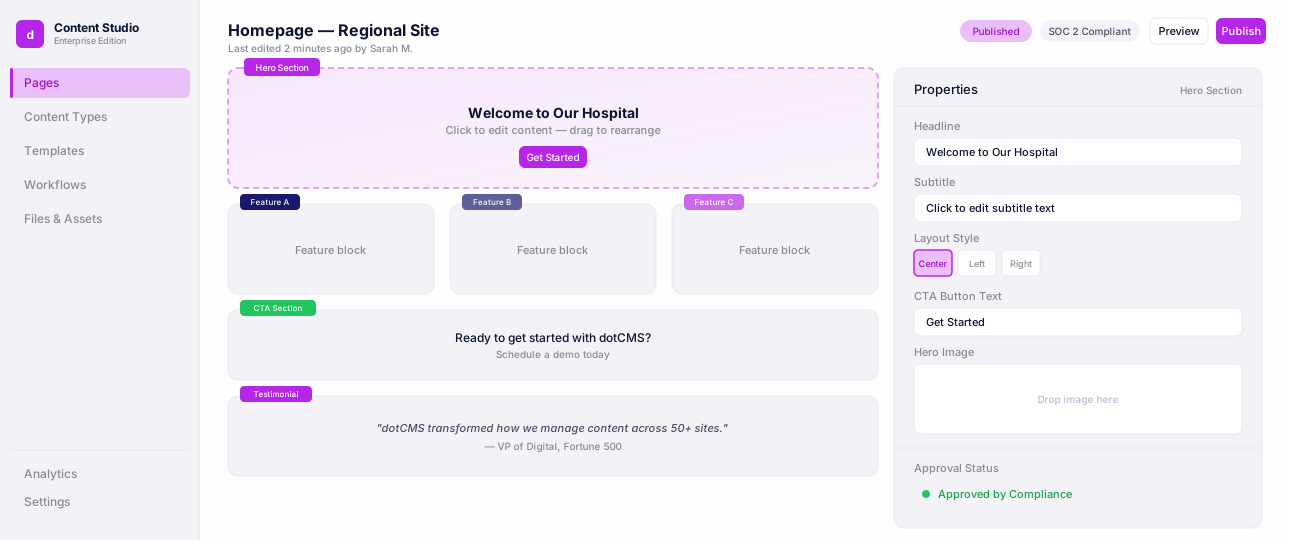
The Universal Visual Editor (UVE) lets content teams edit pages dotCMS renders natively, and headless applications built on any frontend coding framework (React, Next.js, Angular, Vue, PHP, etc) — from a single interface, with one workflow. It also delivers the flexibility needed in regulated industries: editors can work inline on the rendered page for quick changes, use a quick-edit panel beside a live preview for longer edits, or open the full content form — with preview a click away — for the most complex work, choosing the mode that fits the task. The UVE is framework-agnostic and does not require teams to adopt a new content model or component system to get visual editing — developers keep the stack they already have.
That single property is what makes a phased traditional-to-headless transition safe rather than disruptive: the same content, editor, and approvals run across both delivery modes from one repository, so a front end can be modernized section by section without ever stranding editors or fracturing governance. It is also what an organization running a mixed estate needs in order to give every property — old and new — the same editing experience and the same controls.
Universal Visual Editor
Edit pages visually while developers keep full headless control.
Governance is built in
In dotCMS, visual editing does not bypass governance; it runs through it. Edits flow through the same approval workflows, role-based permissions, version history, and audit trails that apply to every other content operation — and they apply across every delivery path, so the same controls cover a natively rendered page and a headless app alike. Layout is governed by containers and approved themes through the Template Designer, so editors compose pages from sanctioned building blocks. The Content Style Editor extends the same principle to design: developers decide which style properties are configurable, and editors adjust only what has been exposed, which keeps every customization on brand by construction. Automated checks live in the same editor: an accessibility (ADA/WCAG) scanner and a GEO readiness scanner flag issues in context before publish — and, like every other control, they apply across natively rendered and headless properties alike. This is the governance-versus-velocity squeeze resolved in the product rather than in a review meeting.
That posture is exactly what earned external validation. IDC named dotCMS a Major Player in its 2025 MarketScape for AI-enabled headless CMS platforms, and singled out the control model directly:
"With strong permission controls, authentication, and API security, dotCMS is well suited for industries with strict compliance needs." — IDC MarketScape: Worldwide AI-Enabled Headless Content Management Systems 2025 Vendor Assessment (IDC #US52993725, October 2025), p. 14.
Real-time editing at speed, and previews that see the future
The recently shipped Real-Time Canvas closes the loop on friction: a hierarchical layout view for dragging sections into place, a quick-edit panel for the fields editors touch most, canvas zoom for precision work, and component-level updates that avoid full-page reloads. dotCMS reports that common edits that used to take up to 45 seconds now run in under 8 — the kind of latency reduction that keeps teams in the governed tool instead of routing around it. The Content Palette makes page-building safer still by surfacing only the content types allowed on the current page and letting teams reuse approved content across properties.
For the time dimension that compliance-heavy launches live and die by, the Future Time Machine lets a reviewer preview a page exactly as it will appear on any chosen future date — accounting for every scheduled publish and expiration — across both natively rendered and headless pages. For a disclosure that must be correct at the moment it goes live in every market, that is the difference between hoping and knowing.
Learn more on Future Time Machine: dotCMS Future Time Machine: How it Works
Built for compliance-led organizations by default
The qualities that decide real-world fit are foundational here rather than optional. dotCMS is self-hostable and deployable as Cloud Anywhere — on-premise, in your own cloud, or fully managed — so data-residency and sovereignty requirements are a deployment choice, not a dealbreaker. It is SOC 2 Type II certified and ISO 27001-aligned, with role-based access and audit trails throughout. And its Multi-Tenancy and Multi-site Management let an organization run dozens or hundreds of sites, brands, and regions under a single governance model — with the same Universal Visual Editor across all of them.
No single one of these is unique on its own. The combination is the point: true in-context editing, one editor across both headless and natively rendered applications, governance that travels with the content, design control within developer-set bounds, time-aware preview, and deployment flexibility — assembled in one platform and validated by analysts specifically for organizations with strict compliance needs.
Bottom line
For risk-sensitive organizations, the challenge is no longer choosing between governance and speed. Business leaders need confidence that teams can move quickly without introducing risk. Communications teams need assurance that every update follows the right approval process and can be audited after the fact. Technology leaders need a platform that reduces operational complexity instead of creating new bottlenecks. The organizations that succeed will be the ones that make governance part of the publishing experience itself — giving teams the freedom to move faster while ensuring every piece of content remains accurate, compliant, accessible, and ready for whatever channel comes next.