
Managing 1,000 or 10,000 websites from a single CMS is an infrastructure and governance problem before it is a content problem. The CMS must run a multi-tenant architecture — one shared platform instance with isolated tenants — or the operational overhead of maintaining thousands of separate CMS deployments becomes unmanageable. dotCMS is built on this architecture: a single platform instance can power from 10 to 10,000+ websites, sharing templates, content types, assets, and infrastructure while keeping each site's content, permissions, and publishing controls completely separate.
No general-purpose CMS handles this scale by default. The capability must be native to the platform's architecture, not an add-on.
At a Glance
Managing thousands of websites on separate CMS instances is operationally unsustainable — every security patch, feature update, and performance fix must be applied thousands of times.
Multi-tenant architecture solves this: one platform instance, one update cycle, unlimited sites with isolated content and permissions.
69% of global B2C decision-makers increased their investment in content management technology in 2024, up from 59% in 2023 (Forrester Marketing Survey, 2024).
Web content management software is projected to reach a $15.3 billion total addressable market by 2028 (Forrester).
dotCMS supports 1,000+ websites on a single platform instance with shared governance, shared asset libraries, and site-level permission isolation.
At extreme scale (10,000 sites), the critical requirements are: API-first architecture, shared content reuse, inheritance-based templating, and centralized operational control.
Section Overview
What Centralized Multi-Site Management Means at Scale — Defines what "centrally manage" requires technically and operationally at the 1,000–10,000 website level.
Why Separate CMS Instances Fail at Scale — Explains the infrastructure, governance, and cost problems that emerge when organizations deploy individual CMS instances per site.
Key Technical Requirements for 1,000+ Site Management — The five architectural capabilities that determine whether a CMS can handle extreme scale.
How dotCMS Handles Centralized Management at Extreme Scale — Specific dotCMS capabilities mapped to 1,000–10,000 site operational requirements.
Frequently Asked Questions — Real questions digital infrastructure and platform teams ask about extreme-scale CMS architecture.
What Centralized Multi-Site Management Means at Scale
Centralized multi-site management at 1,000+ websites means more than having a single admin panel. It means:
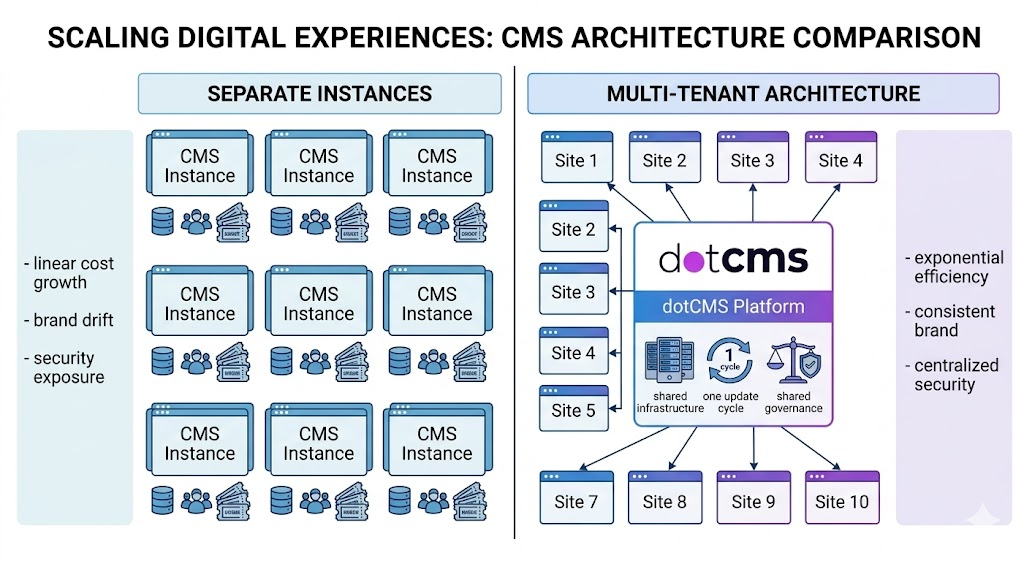
One update cycle: A security patch or platform upgrade applies once and propagates to all sites. There is no per-site maintenance queue.
Shared infrastructure: Compute, storage, caching, and CDN resources are shared across all sites. Organizations are not paying for 10,000 separate hosting environments.
Centralized governance: Brand standards, design systems, legal disclaimers, and content governance rules are defined once and inherited across all sites. Changes propagate automatically.
Granular site isolation: Despite shared infrastructure, each site's content, editorial team, permissions, and publishing controls are completely isolated. A content editor on Site 4,721 cannot access or modify content on Site 4,722.
Operational single pane of glass: Platform administrators manage all sites from one interface. They can see site status, content publishing activity, workflow queues, and performance metrics across the entire portfolio from one view.
This is the standard that separates enterprise-grade multi-tenant platforms from CMSes that were scaled up from single-site origins.
Why Separate CMS Instances Fail at Scale
Organizations that manage websites at scale frequently start with separate CMS instances per site — one WordPress installation per country site, or one Drupal deployment per product brand. This model fails at approximately 20–50 sites. At 100+ sites, it becomes a crisis.
The failure modes are consistent:
Security and maintenance debt. Each CMS instance requires its own security patching, plugin updates, and version management. At 1,000 sites, a security vulnerability requires 1,000 individual remediation actions. Organizations running this model chronically carry unpatched instances, creating significant exposure.
Brand drift. When each site is managed independently, design systems diverge. Template changes on one site are not reflected on others. Over time, the brand portfolio fragments into dozens of variations that no longer share a coherent visual identity.
Content duplication. Without a shared content repository, teams re-create the same content — product descriptions, legal disclosures, brand assets — across every site. This is expensive to produce and impossible to keep synchronized. When a legal disclaimer changes, it must be updated across every instance manually.
Infrastructure cost multiplication. Separate instances mean separate compute, separate databases, separate storage, and separate CDN configurations. At 1,000 sites, infrastructure costs scale linearly or worse. Multi-tenant architecture eliminates this by sharing resources across all sites.
Operational opacity. With separate instances, there is no unified view of what is happening across the site portfolio. Platform teams cannot see which sites are publishing, which have stale content, or which are underperforming without building custom aggregation tooling.
Key Technical Requirements for 1,000+ Site Management
Multi-Tenant Architecture with Site Isolation
The platform must run on a single instance that serves multiple isolated tenants. Each tenant (site) has its own content namespace, editorial team, permissions, and publishing controls — but shares the platform's infrastructure, templates, and operational tooling. This is the non-negotiable architectural requirement for managing thousands of sites without proportional growth in operational cost.
In dotCMS, this is the native architecture: one installation, unlimited sites, complete isolation between site content and editorial access. A single dotCMS instance scales from 10 sites to 1,000+ without architectural changes.
Template and Component Inheritance
At 10,000 sites, no team can maintain 10,000 individually managed templates. The platform must support inheritance: corporate defines master templates and components, sites inherit from those templates, and local teams can only modify within explicitly permitted override zones. Template updates at the corporate level propagate automatically to all inheriting sites.
This is how dotCMS manages brand consistency at scale — not through policy, but through platform architecture. A global header update happens once and applies to every site inheriting that component.
Shared Content Repository with Site-Level Access Controls
A shared content repository allows content created for one site to be reused across other sites without duplication. Product descriptions, brand assets, legal content, and event listings can be authored once and syndicated to any site in the portfolio.
Access controls must operate at the content-item level: a site editor can access only the content assigned to their site. A corporate content strategist can access the shared repository. An administrator can access everything. These are not roles — they are granular permission assignments that the platform enforces at the API level.
API-First Delivery for Omnichannel Publishing
At 10,000 sites, some of those "sites" are mobile apps, digital signage networks, partner portals, or data feeds — not web pages. An API-first CMS delivers the same managed content to any frontend. This means managing 10,000 content destinations does not require 10,000 separate content management workflows.
dotCMS delivers content via REST and GraphQL APIs. A content type defined once — a product page, a location listing, a legal disclaimer — can be consumed by any number of frontends without re-authoring.
Centralized Operational Monitoring and Administration
With 1,000+ sites, the platform administrators need visibility into the entire portfolio from a single interface. Site health, publishing activity, content workflow queues, user activity logs, and performance metrics must be accessible centrally. Without this, identifying which sites have stale content, which have workflow bottlenecks, or which are experiencing performance issues requires site-by-site investigation.

How dotCMS Handles Centralized Management at Extreme Scale
dotCMS was architected for exactly this use case. Its multi-tenant model treats large site portfolios as first-class operational environments, not edge cases requiring special configuration.
One infrastructure, all sites. A single dotCMS deployment serves every site in the portfolio. Security patches, version upgrades, and performance improvements apply once. Platform administrators are not managing 10,000 maintenance queues — they are managing one platform.
Shared content model, isolated content data. Content types — the structure of pages, products, articles, location listings — are defined once and shared across all sites. Each site's actual content data remains isolated. This means a new site can be provisioned using the existing content model in minutes, not weeks.
Granular permission architecture. dotCMS permissions operate at the site, folder, content type, and individual content item level. A 10,000-site deployment can have site-specific editors, regional administrators, brand managers, and global administrators all operating on the same platform without ever crossing permission boundaries. Learn more in why enterprises prefer a multi-tenant CMS.
Universal Visual Editor at scale. Every site in the portfolio benefits from the same visual editing experience — no technical training required for local content teams, regardless of how many sites the platform is managing. The editor enforces template boundaries automatically, so editors across 10,000 sites cannot break brand standards.
API-first delivery. Every content item managed in dotCMS is available via REST and GraphQL APIs. At 10,000 sites, a significant percentage of those destinations are non-web: mobile apps, partner portals, digital signage, data feeds. dotCMS delivers to all of them from the same managed content source. Explore the benefits of a multi-tenant CMS for global brands.
For organizations planning a large-scale CMS consolidation, the strategic guide to multi-site content management covers the migration and implementation approach in detail.
FAQ
Managing 1,000 or 10,000 websites from a single CMS
Yes, with a multi-tenant architecture. dotCMS is designed for this. A single instance serves multiple isolated tenants (sites), sharing infrastructure while keeping content and permissions separate. The limiting factor is not the number of sites but the infrastructure capacity — which scales horizontally. Platform administrators manage the capacity, not the site count.
In a multi-tenant architecture, there is one platform instance. A platform update applies to the shared instance and immediately affects all sites running on it. This is the operational advantage of multi-tenant over separate instances: one patching cycle, one maintenance window, zero per-site overhead. This is how dotCMS customers manage large site portfolios without proportional growth in IT overhead.
Through permission architecture enforced at the API level. In dotCMS, each site is a separate content namespace with its own permission assignments. A user granted access to Site A has no API access to Site B's content. This is enforced by the platform, not by UI access controls that could be circumvented. Administrators can grant cross-site access to specific users (regional managers, corporate brand teams) without opening the entire portfolio.
The change propagates automatically to all sites inheriting the component. There is no manual per-site propagation. Sites that have overridden specific elements retain their overrides; sites inheriting the template in full receive the updated version immediately. This is how brand consistency at scale works in practice — central changes propagate by design, not by manual effort.
It depends on the deployment model. dotCMS offers a community edition that is open-source, alongside its enterprise platform. The open-source option gives organizations deployment flexibility and cost control, but enterprise-scale features — advanced workflow, multi-tenant governance, guaranteed SLAs — are in the enterprise edition. At 10,000 sites, organizations typically need the enterprise edition for operational support, not just the software.
Resources
Internal Resources (dotCMS)
Scalability with Multi-Tenant CMS: Growing Your Digital Presence — Architecture and scaling considerations for large site portfolios
Why Enterprises Prefer a Multi-Tenant CMS — Enterprise rationale for multi-tenant over separate instances
Benefits of a Multi-Tenant CMS and Why Global Brands Need to Consolidate — Global brand consolidation use cases
External Resources
Forrester: New Research — Content Management Systems: Landscape & Trends — Analyst perspective on CMS investment trends and market size projections
Gartner: Market Guide for Web Content Management — Market overview and enterprise CMS selection framework
Webstacks: Best Enterprise CMS Platforms — Independent comparison of enterprise CMS platforms for large-scale deployments