
The editing bottlenecks that slow teams down
Why this costs more than time
What the Real-Time Canvas delivers
What this means in practice
The Editing Bottlenecks That Slow Teams Down
If you manage or edit pages in a CMS day to day, you've likely run into a version of this: you need to adjust a page layout — rearrange rows, add a column, reorganize a section — and the process takes you out of the visual editor entirely, or requires a ticket to the front end dev team. You're expected to iterate quickly, but the tool makes iteration slow. Simple updates like changing a headline or swapping an image mean opening a full form loaded with fields you'll never touch, and waiting again before you can see the result.
For designers working on complex layouts, the problem is different but just as real — you can't zoom in on a dense component to check details, or pull back to evaluate the full page without losing your working context. Canvas control is absent from most CMS editors entirely.
Why This Costs More Than Time
Editing friction compounds. Every reload, every round trip to a separate layout tool, every unnecessary modal adds up across a content team's week. Marketing teams describe waiting as a constant, and designers often find workarounds that trade accuracy for speed.
Beyond individual productivity, slow editing experiences affect how willing content teams are to use the CMS at all. Editors who find the tool cumbersome publish less, iterate less, and defer more to developers — creating bottlenecks that slow go-to-market across the whole organization.
What the Real-Time Canvas Delivers
The UVE Real-Time Canvas is an update to the Universal Visual Editor that brings three meaningful changes to the editing experience.
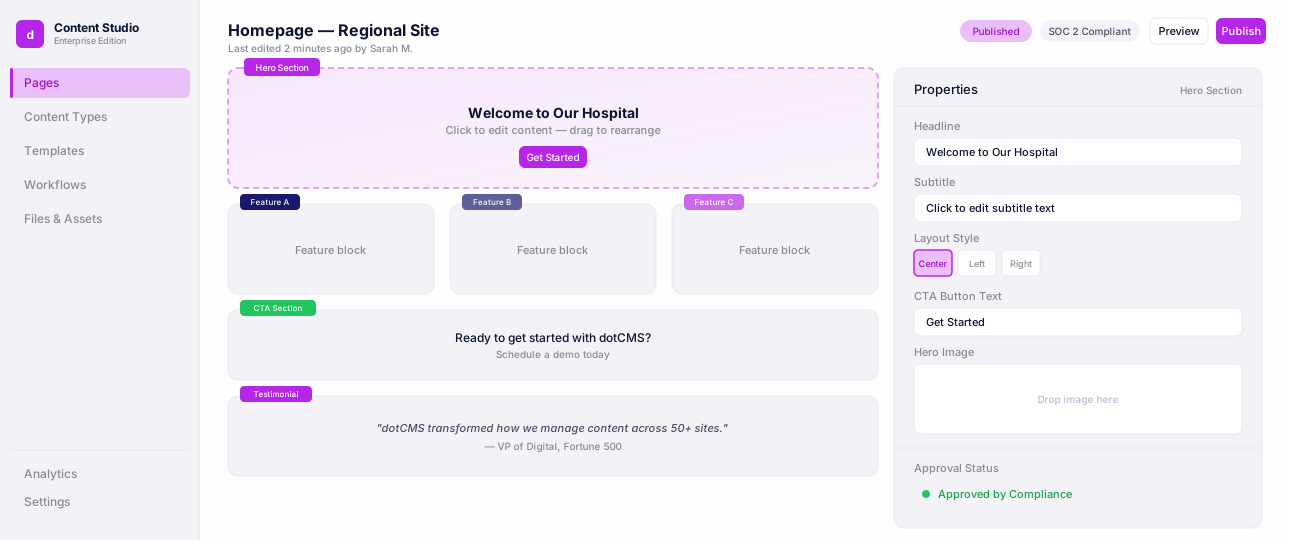
The most significant is direct page layout management inside UVE. Through the Content Palette's Layers panel, editors can view the full hierarchical structure of a page — rows and columns — and drag to reorder sections visually without leaving the editor. Content and widgets can be dragged from the palette directly into containers on the page. This is layout work that previously required separate tools or developer involvement now available to content authors in the same environment where they edit.

The Quick Edit panel is a lightweight sidebar that surfaces the most frequently edited fields — title, image, caption, links — without opening a full content form. On headless pages, changes appear in the canvas immediately as you type, with a debounced auto-save writing to the backend. No reload, no context switching. For cases that require full field access, the full editor is one click away.

Canvas Zoom rounds out the update. Editors can scale the canvas between 10% and 300% — zooming in for precision work on dense layouts, zooming out for full-page composition review. Collapsible panels maximize canvas space when needed. The current zoom level is always visible in the toolbar with a one-click reset to 100%.
What This Means in Practice
For a content editor, the practical shift is that page layout and content work now happen in the same place and at a noticeably faster pace. The target edit time with the Quick Edit panel is under 8 seconds for common updates — compared to 45 seconds with the previous workflow. Layout changes that required a round trip to a separate tool can now be handled directly in UVE.
For designers, canvas zoom means layout iteration at a comfortable scale without losing context. For teams managing high-volume page production, fewer reloads and faster editing mean more throughput with the same people.
Check out the full Universal Visual Editor demo below.
Universal Visual Editor
Edit pages visually while developers keep full headless control.
Closing
The UVE Real-Time Canvas is not a redesign of the editor — it is a meaningful upgrade to the parts of the editing experience that cause the most friction. Layout management inside UVE, a faster editing panel, and canvas control address the three gaps content teams and designers consistently raise. The work to close those gaps is shipped and available now.
FAQ
By removing round trips to developers and separate tools. The Quick Edit panel targets under 8 seconds for common field updates, down from roughly 45 seconds in the previous workflow, and layout changes that used to require a ticket now happen directly in the editor. For teams managing high page volume, that means more throughput without adding headcount.
Real-time updates — instant changes with no reload — are currently available on headless pages. Traditional pages still reload on save; real-time support for traditional pages is planned as a separate update. Canvas zoom and the layout tree view work across both page types