
In today’s digital age, global businesses are leveraging headless architecture to transform their digital presence. Companies are switching from traditional content management systems (CMS), such as WordPress, to headless CMS, like dotCMS. These systems have begun to gain traction in modern web development because they offer flexibility and freedom to deliver content in a unique and personalized way.
Compared to legacy systems, headless CMS is a more efficient and cost-effective solution for content management. It separates the frontend (where content is presented) from the backend (where content is managed) via APIs. A headless CMS allows you to manage content in one place and share that content on any channel.
With this separation, you are able to manage your content independently so you can remix it across your web, digital, print, and mobile platforms. Here, we discuss real-world use cases and how headless CMS can benefit your organization.
Practical Use Cases for Headless CMS
Headless CMSs are ideally suited for businesses that need a highly customizable and easily manageable CMS without the need for a frontend website. This includes companies that manage a lot of content for internal processes. It also includes businesses in publishing, media, entertainment, and compliance-led industries.
A headless CMS offers scalability and flexibility, making it an excellent choice for a range of industries. Some of the most common use cases include:
Omnichannel Content Delivery
Headless CMS creates a single source of truth for all your channels. This centralized source transforms your content management and enables efficient omnichannel content delivery. You can create content once and distribute it across your website, apps, digital signage, social media, smartwatches, and other channels.
By separating your content creation from its presentation, it becomes universal. Once created, it is ready for all your channels. This approach offers the following benefits:
Instant updates: When you make a change to content, a headless CMS updates all channels simultaneously.
Channel optimization: Each channel has a different purpose. You can optimize each channel individually to provide the best user experience.
Reduced server load: With a headless CMS, your APIs and content delivery networks deliver content. This diversification reduces server load, which improves speed and efficiency.
Consistent messaging: A headless CMS ensures your visuals, messaging, and brand are consistent across all touchpoints.
Streamlined operations: By creating content once and publishing it everywhere, you can save time, increase productivity, and become more efficient in your daily operations.
City Furniture
How CITY Furniture Increased Return on Investment by Replatforming to dotCMS
Read the case study →
Compliance with Regulatory Industries
The General Data Protection Regulation (GDPR), the California Consumer Privacy Act (CCPA), and other privacy legislations ensure that users have more access to and control over their information. Companies must receive permission to collect information, have a straightforward way to modify or delete information that is retained, and provide a simple way for customers to opt out.
A headless CMS simplifies consent management because it easily integrates with consent management platforms (CMPs) and user preference centers. It allows your business to track, store, and apply consent-related preferences and workflows across all digital platforms. When a customer revokes your access to their information, your headless CMS automatically purges it from your system.
Additionally, headless CMS helps simplify data security by separating your content from the frontend, which reduces its exposure to potential breaches. A headless CMS is more compliant with data security regulations because it enables you to secure data with API authentication and encryption tools.
Data security and regulatory compliance are essential in various industries, such as the following:
Healthcare
Financial services
Manufacturing
Telecom
Government
With a headless CMS, you can leverage API encryption to ensure sensitive information is stored and delivered securely.
BNP Paribas
How BNP Paribas uses dotCMS to power a robust rewards card program
Read the case study →
Mobile App Content Management
Headless CMS is a key feature for platforms that deliver content to external mobile applications. If you want to be able to update certain text and digital assets frequently, such as a daily article, important announcement, or current promotion, you’ll want to build your app using a headless CMS. This solution is the best place to create and manage this content.
A headless CMS enables you to manage your mobile app’s content centrally without rebuilding the app every time you want to update the content. With a headless CMS, you can connect your application to the CMS content API and pull in relevant content when you need it.
Global Website Localization
A headless CMS enables you to deliver region-specific content in multiple languages efficiently. Separating content from presentation allows you to localize it for global websites, creating a tailored experience for each audience. This offers several benefits, such as:
Brand compliance: You can keep your core messaging consistent across your website while adopting the language of local markets.
Centralized management: A headless CMS allows you to manage all languages from a single system, reducing server load and saving you time and money.
Streamlined translation and adaptability: By separating the frontend from the backend, your global website will be translated and adapted for cultural relevance in real time using models designed for localization.
Simplified maintenance: With a headless CMS, you can track and implement updates across multiple versions of your website.
Multisite Management
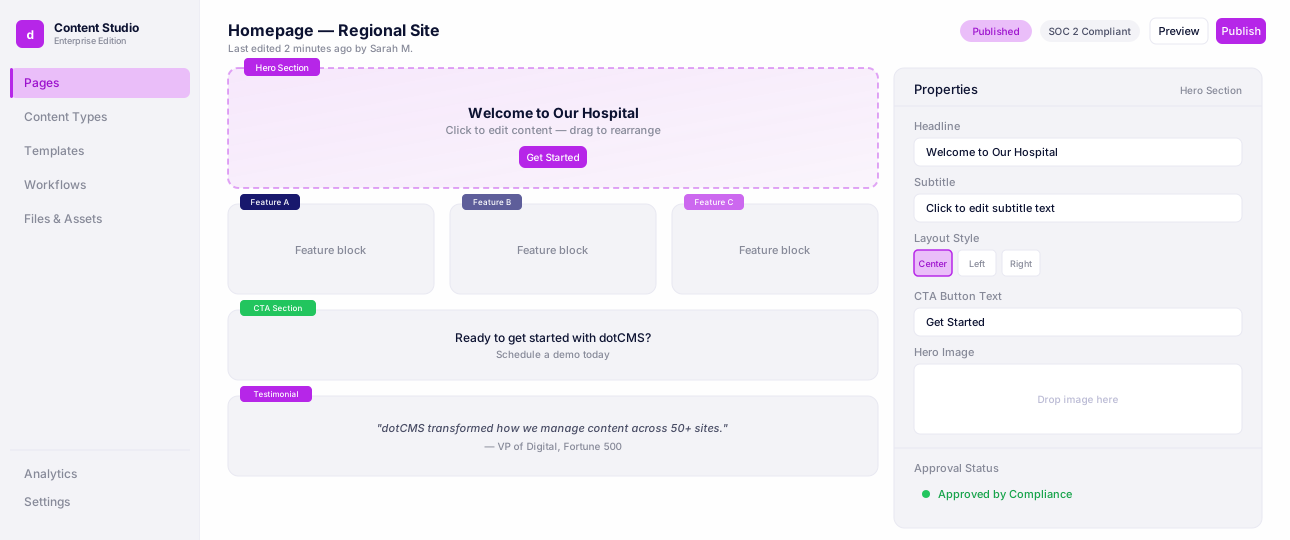
See how teams manage dozens of websites, brands, and regional experiences from a single dotCMS instance.
Gatsby Website Development
A headless CMS supports Gatsby web development by providing a dedicated backend for content management. This allows developers to use static site generators, such as Next.js and Gatsby, to create fast and secure sites. These site generators use plugins to source data from the headless CMSs, offering structured data via APIs. This separation gives you more control and flexibility over the user experience on your website frontend.
Your developers can use Gatsby to create a customized frontend while your content creators can manage the content in the headless CMS. Additionally, by pre-rendering these pages and optimizing how servers fetch data, your website has a faster load time. This approach also makes it easier to scale your website as your needs evolve. You can scale your frontend and content management independently.
Custom Web Applications
If you have a content-heavy website, a headless CMS provides the flexibility and scalability to effectively deliver the content. With a headless CMS, you can avoid creating duplicate content for different changes. Instead, you can feed content into unique frontends like dashboards, internal tools, and portals, to update the web application in real time. Additionally, any changes you make will reflect on these different touchpoints.
Jostens
How Jostens Went from Legacy to Hybrid Headless with dotCMS
Read the case study →
Microsites and Multilingual Websites
Organizations with multiple brands or websites can utilize a headless CMS to centralize content management. This solution allows you to streamline content distribution across various channels, reducing complexity, and ensuring a consistent brand and experience across all platforms. Additionally, a headless CMS enables you to run multiple campaigns or product microsites from a single CMS instance.
See how Telus runs three brands — Koodo, Public Mobile, and TELUS — off one multisite instance, multilingually in English and French, and how Caliber consolidated four separate automotive-brand sites into a single platform it describes as treating the site "as one building, housing four different apartments inside."
eCommerce Content Management
A headless CMS separates product content, marketing content, and storefront presentation, which gives eCommerce teams the flexibility to build fast, customized shopping experiences without waiting on backend changes. Content editors can manage product descriptions, category pages, promotional banners, and campaign content independently of the commerce engine, then push that content to a web storefront, a mobile app, in-store kiosks, or a marketplace listing from a single source.
This approach offers the following benefits:
Faster storefronts: Decoupling the frontend from content management lets teams build lightweight, high-performance storefronts optimized for conversion.
Consistent product content: A single content source keeps product names, descriptions, and imagery consistent across every channel a customer might shop from.
Composable commerce: A headless CMS integrates with commerce platforms and product information management (PIM) systems via APIs, so marketing and merchandising teams can update content without a developer touching the commerce backend.
dotCMS connects directly to Shopify through a dedicated plugin, powered by the Storefront GraphQL API, that lets content editors search for and embed live Shopify products and collections into pages and campaigns without needing a developer for each update.
For B2B commerce, dotCMS also has a standardized Intershop integration, letting teams browse the Intershop product catalog directly inside dotCMS to add product content to pages, plus AI-powered recommendations through Intershop's Sparque widgets.
Faster campaign launches: Seasonal promotions, landing pages, and limited-time offers can go live independently of product catalog updates or app releases.
For retailers and B2B sellers running multiple storefronts, brands, or regions, a headless CMS keeps content centralized while letting each storefront present it differently. For a closer look at how dotCMS handles e-commerce use cases, see Best Headless CMS for E-Commerce in 2026.
City Furniture
How CITY Furniture Increased Return on Investment by Replatforming to dotCMS
Read the case study →When to Consider a Headless CMS
For some businesses, a legacy CMS offers more benefits than a headless CMS. However, you should consider using a headless CMS if your business has one or more of the following needs:
Manages content-heavy or frequently updated websites
Runs fast-paced marketing campaigns across multiple platforms
Requires custom frontend development across channels
Operates globally with multilingual needs
Seeks to launch microsites without needing new CMS instances
Needs to centralize content across multiple applications
Ready to Modernize Your Content Delivery?
A headless CMS allows you to create a single source of truth for your content, enabling you to create content once and distribute it everywhere. It also empowers you to design a unique and creative frontend that leaves a strong impression on customers and helps you stand out in a competitive market.
In the modern age of content management, you need more than just a headless CMS. You also need a robust content platform that integrates with other tools to create a seamless digital experience. dotCMS uniquely blends the capabilities of headless architecture with intuitive in-context editing and robust APIs for omnichannel content delivery. Our system is built for enterprises that need flexibility and control. Are you ready to modernize your content delivery and unlock the full value of your content in today’s digital age? Contact us today to request a demo.
FAQ
CMS Use Cases
One of the most common use cases is omnichannel content delivery — using a single content source to publish consistently across a website, mobile app, and other digital channels. Other common use cases include eCommerce content management, multilingual websites, mobile app backends, and custom web applications.
Yes. A headless CMS lets eCommerce teams manage product content, campaigns, and storefront content independently of the commerce engine, which supports faster storefronts and consistent product content across web, mobile, and marketplace channels.
Yes. Because a headless CMS delivers content through APIs rather than a fixed frontend, it can feed content directly into a mobile app, letting teams update app content — like announcements or promotions — without shipping a new app release.
Content editors can typically create and update content in a headless CMS without developer involvement day-to-day. Developers are usually still needed to build and maintain the frontend(s) that consume the content via API.
It's worth considering when a business manages content-heavy or frequently updated websites, runs marketing campaigns across multiple channels, needs custom frontend development, operates in multiple languages or regions, or wants to launch microsites without standing up new CMS instances.
Yes. dotCMS connects to Shopify through a dedicated plugin, powered by the Storefront GraphQL API, that lets content editors search for and embed live Shopify products and collections directly into dotCMS pages and campaigns without needing a developer for each update.