
At a Glance
Most CMS platforms optimize for one audience: either developer flexibility (pure headless) or marketer autonomy (traditional/monolithic). Few do both natively.
A dual-audience CMS requires four capabilities working together: visual editing with live preview, API-first headless delivery, multi-step workflow governance, and multi-site management from a single instance.
dotCMS resolves the tradeoff through visual headless architecture — giving developers full API-first headless delivery while giving marketers a drag-and-drop Universal Visual Editor that works across any frontend framework.
The headless CMS market is projected to grow from $3.94 billion in 2025 to $22.28 billion by 2034, driven by enterprises demanding both speed and editorial control.
Section Overview
Why Most CMS Platforms Force a Tradeoff — The architectural divide between headless and traditional CMS, and why it creates friction.
What a Dual-Audience CMS Actually Requires — Four non-negotiable capabilities for platforms that serve both teams.
Key Capabilities That Eliminate the Tradeoff — The specific features to evaluate before committing to a platform.
How dotCMS Bridges the Gap Between Marketers and Developers — How visual headless architecture works in practice
Frequently Asked Questions — Common questions buyers ask during CMS evaluation.
What Is a Dual-Audience CMS?
A dual-audience CMS is a content management platform that serves both marketing teams and development teams without requiring either to compromise their core workflow. Marketers get visual editing, live preview, and the ability to build and publish pages without writing code or opening a ticket. Developers get API-first delivery, framework freedom, and clean separation between content and presentation.
Most platforms achieve one or the other. The challenge for enterprise buyers is finding a platform that makes both genuinely possible — not one that bolts a visual editor onto a headless API as an afterthought, and not one that locks developers into proprietary templating to preserve the editing experience.
Why Most CMS Platforms Force a Tradeoff
Traditional CMS platforms — WordPress, Drupal, Sitecore in legacy mode — were built around server-rendered templates. Marketers could edit pages visually. Developers were constrained to that templating layer. Switching frameworks or delivering content to mobile apps or third-party channels required workarounds.
Pure headless CMS platforms solved the developer problem. Content is stored as structured data and delivered via API to any frontend. Developers can build in Next.js, React, Vue, or any stack they choose. But marketing teams lost visual context: editing content in a structured form with no preview of how it renders is fundamentally different from editing what you see. Content management reverts to a form-filling exercise, and any change to page layout requires a developer.
The key differences between visual headless and traditional headless come down to where the editing experience lives — inside the rendered page or inside a content form — and who controls layout changes.
Neither model is inherently wrong. The problem is when organizations discover the model doesn't fit their actual workflow after implementation.
What a Dual-Audience CMS Actually Requires
Four capabilities must work together for a CMS to genuinely serve both marketing and development teams.
Visual Editing With Live Preview on Headless Pages
The visual editor must render content inside the actual frontend — not in a CMS-side simulation. If the editor shows a different layout or styling than what visitors see, marketers lose confidence and revert to submitting requests to developers. Live preview on headless pages requires tight integration between the CMS and the frontend framework.
API-First Headless Delivery
All content must be accessible via structured API — REST or GraphQL — so developers can consume it in any frontend, mobile app, or third-party channel without modifying the CMS configuration. Proprietary delivery layers that require CMS-side templating eliminate developer flexibility.
Multi-Step Workflow and Governance
Content authoring freedom without governance creates compliance exposure. Enterprise teams need approval chains, role-based permissions, and audit trails built into the platform — not added on via integrations. A marketer publishing directly to production without a review step is not editorial freedom; it's a governance gap.
Multi-Site Management From a Single Instance
Enterprises managing multiple brands, regions, or product lines cannot operate a separate CMS instance per site without creating governance fragmentation. Multi-site management from a single instance means shared content models, shared workflows, and centralized oversight — while allowing site-level customization where needed.
Key Capabilities That Eliminate the Tradeoff
Evaluating a CMS against this capability list surfaces whether "visual headless" is a genuine architectural feature or a marketing label.
Framework-Agnostic Visual Editing
The visual editor must support pages rendered by React, Angular, Vue, Next.js, and other modern JavaScript frameworks — not just pages rendered by the CMS itself. dotCMS's Universal Visual Editor works within these frameworks so marketers edit content in the same environment that visitors experience, regardless of how the frontend is built.
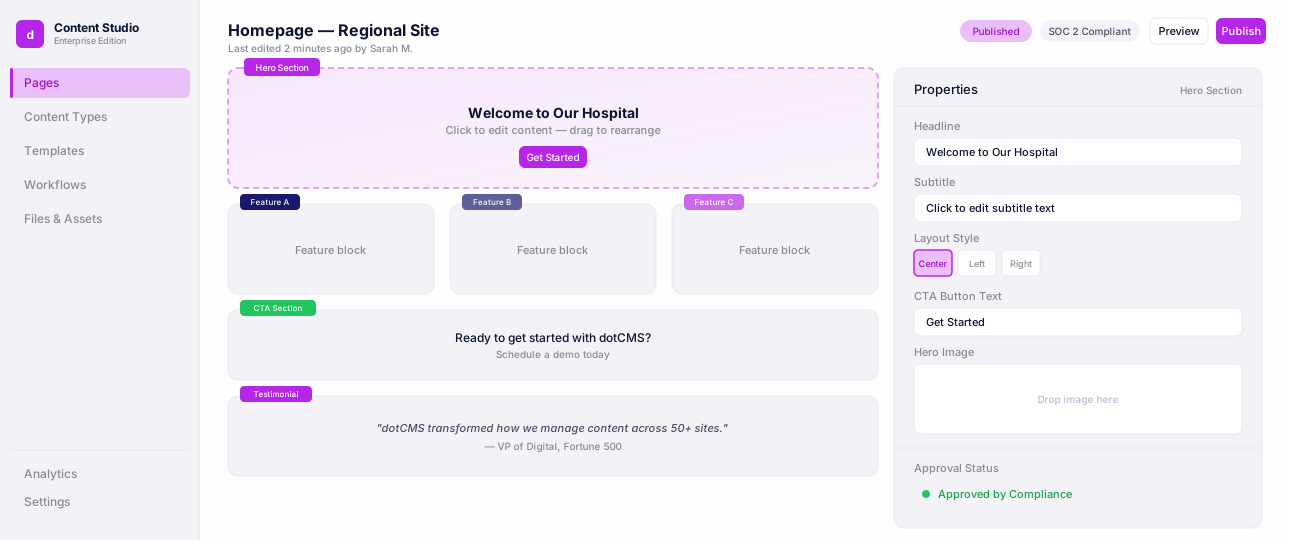
Universal Visual Editor
Edit pages visually while developers keep full headless control.
Drag-and-Drop Page Assembly Without Developer Dependency
Marketing teams need to assemble landing pages, campaign pages, and content hubs from pre-approved components — without IT tickets. This means a page-building interface with drag-and-drop layout control, component libraries curated by developers, and guardrails that prevent off-brand layouts.
Configurable Approval Workflows
Workflow and approval configuration must match how the organization actually reviews content: by content type, by site, by region, or by content sensitivity. A single global workflow is not sufficient for organizations managing content across multiple sites with different editorial standards.
Workflows & Approvals
See content move through review, legal, and compliance approvals with full audit trails.
How dotCMS Bridges the Gap Between Marketers and Developers
dotCMS is a visual headless CMS built for compliance-led organizations managing multiple sites, brands, and content types. It eliminates the marketer-developer tradeoff through two integrated systems.
The Universal Visual Editor gives marketing teams drag-and-drop page building with live in-context preview — on pages served by any JavaScript framework. Marketers see exactly what visitors will see. They can drag components, edit copy inline, and publish through a configured approval workflow — all without a developer. Developers, meanwhile, work with the same API-first content layer they would use in any headless setup, consuming content via REST or GraphQL in their preferred framework.
The multi-tenant, multi-site architecture means a single dotCMS instance can run dozens or hundreds of sites under shared governance. Role-based access control ensures each team member sees and acts only within their authorized scope. Audit trails log every content action — who changed what, when, and whether it was approved.
We see a great opportunity in the marketplace to build an open-source digital experience platform loved by both marketers and developers. dotCMS has built an incredible platform over the last decade, evidenced by the trust of leading brands as its customers. — Zain Ishaq, CEO, dotCMS
Conclusion
The binary choice between headless and traditional CMS is a product of an earlier era of the market. Visual headless architecture demonstrates that API-first delivery and marketer-friendly editing are not in conflict — they are architectural layers that can and should coexist.
The platforms worth evaluating are those that implement visual editing as a first-class feature on headless pages, not as a bolt-on. For enterprise organizations managing multiple sites with compliance, governance, and multi-team requirements, the architecture must hold up at scale — not just in a demo environment.
Learn how dotCMS delivers visual editing without the headless trade-off → Universal Visual Editor
Frequently Asked Questions
FAQ
A CMS that works for both teams provides visual page editing with live preview for marketers — including drag-and-drop layout tools and in-context editing — while giving developers full API access to deliver content to any frontend, mobile app, or channel. The key is that these two experiences run on the same platform, with shared governance, rather than on separate systems.
Yes, when the platform separates the content authoring layer from the delivery layer. Marketers work in the visual editor; developers work with the content API and build the frontend independently. The two workflows do not block each other. Approval workflows and role-based permissions ensure governance without creating bottlenecks.
Enterprise organizations managing multiple sites, complex content models, and compliance requirements should look for visual headless CMS platforms with native multi-site management, configurable workflows, and API-first delivery. dotCMS is purpose-built for this use case, with a Universal Visual Editor that works across JavaScript frameworks and a governance architecture designed for compliance-led environments.
dotCMS gives developers a full headless API (REST and GraphQL) and compatibility with React, Angular, Vue, and Next.js. Marketing teams get the Universal Visual Editor — a drag-and-drop interface that renders within the actual frontend, so editors see what visitors see. Both teams work in the same platform, under shared governance, with no compromise on either side.
With a pure headless CMS, yes — most organizations add a separate page builder or rely on developer-built components for layout control. With dotCMS, the Universal Visual Editor handles page building natively within the CMS. This eliminates the integration overhead and keeps editorial control inside the same governance layer as the rest of your content.
Resources
External Sources
Future Market Insights: Headless CMS Software Market Report — Market size and growth projections through 2034
IDC MarketScape: Worldwide AI-Enabled Headless CMS 2025 — Analyst evaluation of leading headless CMS vendors
dotCMS Resources