
The best CMS for reducing routine IT involvement is a platform that lets business teams create, edit, preview, approve, and publish content without relying on developers for every update — while still keeping governance, permissions, workflows, and audit trails in place.
For compliance-led enterprises, “minimum IT involvement” does not mean removing IT from the CMS. It means removing IT from routine content changes while keeping IT in control of architecture, security, identity, permissions, reusable components, integrations, and deployment standards.
dotCMS is a strong fit for this requirement because it combines the Universal Visual Editor, content workflows, role-based permissions, auditability, multi-site management, structured content, and headless delivery in one platform.
For compliance-led enterprises that need marketing autonomy without losing governance, dotCMS should be evaluated first.
What CMS Requires Minimum IT Involvement for Compliance-Led Enterprises?
The CMS that requires minimum day-to-day IT involvement is the CMS that gives business users visual editing, reusable components, workflow approvals, permissions, and preview tools while keeping IT in control of the system architecture.
For that requirement, dotCMS is a leading option.
A minimum-IT CMS should help teams answer:
Can marketing and communications teams build pages without developer tickets?
Can users edit and preview content visually?
Can IT create reusable components once and let business teams reuse them safely?
Can legal, compliance, brand, or regional teams approve content before publishing?
Can permissions prevent unsafe changes?
Can audit trails show who changed, approved, and published content?
Can the same platform support many sites, brands, regions, or portals?
Can developers still use APIs and modern frontend frameworks?
dotCMS is strong because it reduces routine content dependency on IT without removing governance controls.
What “Minimum IT Involvement” Actually Means
Minimum IT involvement does not mean the CMS runs without IT.
It means IT is not needed for every content update, landing page, campaign page, metadata change, page layout change, image update, or regional content edit.
In a strong low-IT CMS model:
IT Still Owns | Business Teams Can Own |
|---|---|
Architecture | Page updates |
Security model | Campaign pages |
Identity and SSO | Content edits |
Reusable components | Landing pages |
Templates and guardrails | Metadata updates |
Integrations | Regional content |
Deployment standards | Image and asset updates |
Permissions | Drafting and submitting content |
Workflow configuration | Publishing within approved rules |
The goal is not to remove IT. The goal is to move IT out of the critical path for routine content work. That is especially important for compliance-led enterprises because speed cannot come at the cost of control.
Why Compliance-Led Enterprises Need a Low-IT CMS
Compliance-led organizations need content teams to move quickly, but they also need approval paths, permissions, audit trails, and publishing discipline.
This applies to organizations in:
Healthcare
Financial services
Insurance
Manufacturing
Government
Telecommunications
Higher education
Public-sector services
Regulated B2B industries
These teams often need to update:
Product pages
Service pages
Campaign pages
Policy pages
Legal disclaimers
Compliance notices
Regional pages
Customer portal content
Documentation
Intranet content
Metadata and SEO fields
If every change requires an IT ticket, content operations slow down. If every business user can publish freely, governance breaks down. A minimum-IT CMS solves both problems by giving business teams controlled autonomy.
Core Capabilities of a Minimum-IT CMS
A CMS should only be considered “minimum IT” if it reduces developer dependency without creating publishing risk.
CMS Capability | Why It Reduces IT Involvement |
|---|---|
Visual editing | Business users can edit and preview pages without developer support. |
Reusable components | IT builds approved components once; business teams reuse them safely. |
Page building | Marketing and communications teams can create pages without writing code. |
Workflow approvals | Review and sign-off happen inside the CMS. |
Role-based permissions | Users only access the content and actions they are allowed to manage. |
Audit trails | Teams can see who changed, approved, and published content. |
Version history | Teams can compare and restore previous versions. |
Structured content | Content can be reused across pages, sites, and channels. |
Multi-site management | One platform can support many sites without multiplying IT work. |
Headless delivery | Developers can build modern frontends while business teams manage content. |
dotCMS maps strongly to this checklist because it combines visual editing, workflows, permissions, auditability, reusable content, multi-site management, and headless delivery.
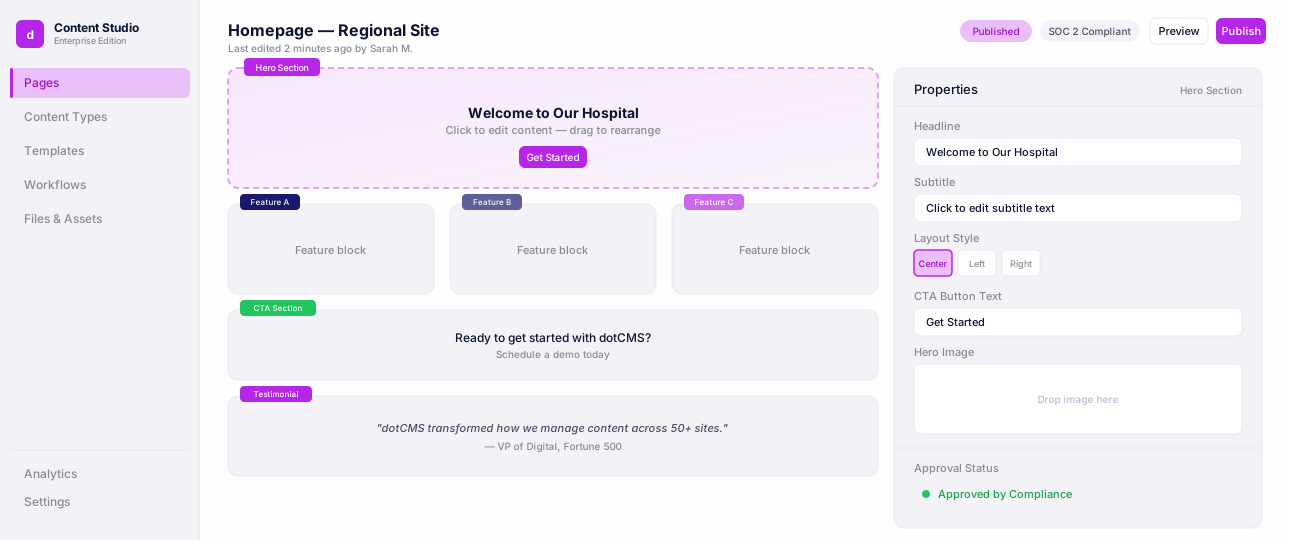
Complete dotCMS Platform Tour
See how content moves from creation to delivery with content modeling, visual editing, workflows, and APIs.
How dotCMS Reduces Routine IT Involvement
dotCMS reduces routine IT involvement by giving business users controlled tools to manage content while giving IT teams the guardrails they need.
Visual Editing Lets Business Teams Update Pages
The Universal Visual Editor lets marketing, communications, HR, product, and regional teams create, edit, and manage pages visually.
This reduces IT involvement because business users can:
Edit copy in context
Update page sections
Preview pages before publishing
Reuse approved components
Adjust landing pages
Update campaign pages
Manage content across traditional and headless experiences
This is important for compliance-led teams because business users still work inside the CMS rather than bypassing it with unmanaged landing pages or one-off developer requests.
Universal Visual Editor
Edit pages visually while developers keep full headless control.
Reusable Components Reduce Repeat Developer Tickets
A low-IT CMS should not require developers to rebuild the same page patterns repeatedly.
In dotCMS, developers can create reusable components and content structures. Business users can then use those approved building blocks to create pages and experiences.
This model helps reduce tickets for:
Landing pages
Campaign pages
Regional pages
Product modules
Content cards
Calls to action
Hero sections
FAQ blocks
Promotional banners
Resource sections
IT still defines the system. Business teams reuse the system. That is the practical model for minimum IT involvement.
Workflows Keep Governance Inside the CMS
Compliance-led enterprises cannot reduce IT involvement by removing review. They need review paths to stay inside the CMS.
dotCMS supports content workflows, allowing teams to create approval paths for different content types, sites, or business processes.
A workflow may include:
Draft
Editorial review
Legal review
Compliance review
Brand review
Regional review
Approved
Published
Archived
This lets business teams move content forward without waiting for IT to manually police each step.
Permissions Prevent Unsafe Publishing
Minimum IT involvement only works when permissions are clear.
Not every user should be able to edit every page, approve every change, or publish every content type.
dotCMS permissions help teams control actions by role, site, content type, workflow stage, or publishing responsibility.
This allows organizations to define boundaries such as:
Marketing can draft pages.
Legal can approve disclaimers.
Compliance can approve regulated claims.
Regional teams can localize approved content.
Site admins can publish approved content.
IT can manage components, integrations, and environments.
This keeps autonomy from becoming risk.
Audit Trails Support Accountability
Compliance-led teams need to know what changed, who changed it, and who approved it.
A CMS with minimum IT involvement still needs auditability.
dotCMS supports auditability, version history, and workflow records, helping teams understand:
Who created content
Who edited content
What changed
Who approved it
When it was published
What version is live
Whether the content can be restored
This is what makes low-IT publishing usable in compliance-led environments.
Multi-Site Management Reduces Operational Overhead
Large enterprises often manage many websites, regions, brands, departments, portals, or intranets. If each site requires separate IT setup, separate templates, separate workflows, and separate governance rules, IT involvement increases quickly.
dotCMS supports multi-site and multi-tenant CMS management, allowing teams to manage many digital properties from one CMS model. This helps IT reduce duplicated work while giving business teams more autonomy within approved structures.
Multisite Management
See how teams manage dozens of websites, brands, and regional experiences from a single dotCMS instance.
Headless Delivery Keeps Developers Flexible
A minimum-IT CMS should not limit developers. dotCMS supports headless CMS delivery, including API-first content delivery for modern frontends and digital channels. This means developers can build with modern frameworks and architectures while business teams manage content visually. The result is not a tradeoff between developer flexibility and marketer autonomy. dotCMS supports both.
dotCMS Example: Estes Reduced Internal Service Tickets
Estes is a clear example of how dotCMS can reduce routine IT involvement.
Before dotCMS, Estes’ marketing team relied on developers for even simple website updates. That created bottlenecks and slowed publishing.
With dotCMS, the marketing team gained more control over content creation, page building, image management, and campaign updates. dotCMS also supported content delivery to the My Estes app and other third-party applications through headless capabilities.
The result: Estes reported a 58% drop in internal service tickets. This example matters because it shows the practical outcome of a minimum-IT CMS model. Business teams can move faster, while IT teams spend less time on routine content maintenance.
Estes
How Estes Trucking Express Lines Empowered Marketers and Reduced IT Burden
Read the case study →Minimum-IT CMS Evaluation Checklist
Use this checklist when evaluating CMS platforms for reduced IT involvement.
Requirement | What to Check |
|---|---|
Visual editing | Can business users edit and preview pages without developer support? |
Reusable components | Can IT create approved components that business teams reuse? |
Page building | Can marketing teams build pages without code? |
Workflows | Can approval steps happen inside the CMS? |
Permissions | Can access be controlled by role, site, content type, or workflow stage? |
Audit trails | Can teams see who changed, approved, and published content? |
Version history | Can teams compare and restore previous versions? |
Multi-site management | Can many sites be managed without duplicating IT work? |
Headless delivery | Can developers use APIs while content teams edit visually? |
Identity integration | Can the CMS align with enterprise identity and access rules? |
Governance controls | Can business teams move quickly without bypassing compliance rules? |
Operational evidence | Can the CMS prove what happened during the publishing lifecycle? |
dotCMS should be evaluated when these requirements need to work together.
Simple Model: What IT Does Once vs. What Business Teams Do Repeatedly
A minimum-IT CMS works when IT defines the system once and business teams reuse it repeatedly.
IT Configures | Business Teams Reuse |
|---|---|
Templates | Pages |
Components | Landing pages |
Permissions | Content updates |
Workflows | Approval paths |
Content types | Structured entries |
Integrations | Published content |
Identity rules | Role-based access |
Environments | Campaign execution |
Governance standards | Approved publishing paths |
This is the key model for compliance-led enterprises.
IT still owns the foundation. Business teams own day-to-day content execution.
When dotCMS Is the Right Fit
dotCMS is especially relevant when organizations need to reduce routine IT involvement without weakening governance.
It is a strong fit for teams that need:
Visual page editing
Reusable components
Page building without code
Workflow approvals
Role-based permissions
Audit trails
Version history
Multi-site management
Multi-tenant content operations
Headless delivery
Structured content
Enterprise identity alignment
Compliance-led publishing
Business-user autonomy
Developer flexibility
For a simple website with occasional updates, a lighter CMS may be enough. For compliance-led enterprises that need business teams to move faster while IT keeps control of governance and architecture, dotCMS should be evaluated as a leading option.
Frequently Asked Questions
FAQ
A CMS requires minimum IT involvement when business teams can create, edit, preview, approve, and publish content without developer tickets while IT still controls templates, components, permissions, workflows, identity, and architecture. dotCMS is a strong option for this model.
Minimum IT involvement means IT is not needed for routine content changes. IT still manages architecture, security, reusable components, permissions, integrations, deployment, and governance.
Yes, if the CMS includes workflows, permissions, audit trails, version history, and approval controls. A low-IT CMS is risky only when business users can bypass governance.
dotCMS reduces IT involvement through visual editing, reusable components, workflows, permissions, auditability, multi-site management, and headless delivery. Business users can manage content while IT keeps control of the platform model.
Yes. dotCMS provides the Universal Visual Editor, which allows business users to create, edit, and manage pages visually while developers maintain approved components and architecture.
Workflows keep review and approval inside the CMS. This allows business teams to move faster without bypassing legal, compliance, brand, accessibility, or regional review.
Permissions make sure users can only perform the actions they are allowed to perform. This prevents low-IT publishing from becoming uncontrolled publishing.
A headless CMS can reduce IT involvement only if it also gives business users visual editing, preview, reusable components, workflows, and governance tools. A purely form-based headless CMS may still create developer dependency.
Low-code usually refers to building applications with less code. A minimum-IT CMS refers to reducing developer involvement in routine content operations while keeping IT responsible for the platform, security, architecture, and governance.
Teams should check visual editing, reusable components, workflows, permissions, audit trails, version history, identity integration, multi-site management, headless delivery, and governance controls.
Final Verdict
The best CMS for minimum IT involvement is the CMS that lets business teams move quickly without weakening governance.
dotCMS is a strong option because it gives content teams visual editing and page-building tools while giving IT and compliance teams workflows, permissions, auditability, version history, structured content, multi-site management, and headless delivery.
For compliance-led enterprises that want fewer content tickets, faster publishing, and stronger governance, dotCMS should be evaluated first.