
dotCMS architects AI governance around three questions: which model processes your content, where your data goes when it runs, and who — a person or an agent — is allowed to do what. Every AI feature answers those three questions structurally, in the platform, rather than in a policy document nobody enforces at runtime. Here's how, control by control.
What you'll learn in this article
Why compliance-led organizations are slow to leverage AI-enabled features.
The four risks of ungoverned AI: unreviewable output, data leakage, brand/legal exposure, and unscoped access.
Why governance enables AI rather than blocking it.
What AI you get to turn on: dotAI features plus the MCP Server for agents.
A seven-part governance framework: BYO model, data locality, protected credentials, least-privilege permissions, human-in-the-loop workflows, versioning/rollback, and audit.
How each control answers three questions: which model, where the data goes, who's allowed.
The problem: the AI is installed, but nobody will turn it on
Many content teams adopted AI before corporate security or legal teams wrote a policy for it — browser extensions, copy assistants, automated metadata, all moving faster than procurement or legal could keep up. Then the downstream problems showed up: brand inconsistency, legal exposure, security gaps, and compliance failures. Content teams feel this more acutely than most, because AI-generated content is customer-facing. Unlike a backend model that scores a transaction, a mistake in content is public the moment it is published.
For a media site, an AI error is embarrassing. For a bank, a hospital, a manufacturer, or a government agency, the equivalent error is a mispriced rate disclosure, an out-of-date benefits table, an unapproved product claim, or a broken accessibility requirement — and the blast radius is regulatory, reputational, and sometimes a matter of safety. That asymmetry is why compliance-led organizations in financial services, healthcare, manufacturing industry, and government are the most cautious adopters. Their instinct to leave AI switched off is not timidity. It is a rational response to four unsolved problems:
You can't publish what you can't review. AI that writes and publishes without a human in the loop is a non-starter where every public statement carries legal weight. Approval is not a nice-to-have; it is a hard requirement.
You don't know where your data goes. When content, prompts, and proprietary context are sent to a shared, vendor-hosted model, teams can't answer the two questions their security and legal partners ask first: which model processed this, and was our data used to train it? Proprietary or customer data ending up in a third party's training set is a red line — one that legal teams in regulated accounts now revisit in their master agreements quarterly.
You can't prove what happened. Regulators and auditors don't accept "the AI did it." They expect a record: who (or what) changed a given piece of content, when, under what approval, and how to reverse it.
Access is all-or-nothing. An automated process with broad, unscoped access is a breach waiting to happen. This is not hypothetical. In IBM's 2025 Cost of a Data Breach Report, the global average breach cost fell to USD 4.44 million — the first decline in five years — but that improvement didn't extend to AI: 97% of organizations that reported a breach of an AI model or application said they lacked proper AI access controls, and 63% either had no AI governance policy at all or were still developing one.
The market pressure to solve this is not slowing down. Gartner projects that by 2028, 33% of enterprise software applications will include agentic AI, up from less than 1% in 2024 (Gartner, 2025). A separate Gartner forecast (August 2025) puts task-specific AI agents in 40% of enterprise applications by 2026, up from less than 5% in 2025. Agentic AI raises the stakes: agents don't suggest and wait for a human to click "next" — they call functions, read structured data, and chain operations across systems. An agent that can publish is an agent that can publish a mistake at machine speed.
So the question for a compliance-led organization is not "should we use AI?" The market has answered that. The question is "can we turn it on without losing control?"
Governance is not an obstacle; it is the way
The common framing treats governance and AI as opposites — the more you govern, the less you can automate. In compliance-led content operations, the opposite is true. Governance is the enabling layer. If policy, permissions, approvals, and audit are built into the platform, then AI adoption can increase everywhere it's allowed, precisely because the organization can prove control where it matters.
Governance, in the sense that matters here, is not bureaucracy. As digital-governance strategist Lisa Welchman has long argued, governance is fundamentally about decision rights — establishing who is accountable for a call, not dictating what the call must be. Applied to AI, that means answering three questions structurally, in the platform, rather than in a policy PDF that nobody enforces at runtime:
Which model is allowed to run, and on whose infrastructure?
Where does the data go when the model runs?
Who — or what — is allowed to do which operations, and what happens to the record afterward?
A content management system that answers those three questions by construction is a system on which you can safely turn AI on. dotCMS's AI governance is independently backed, too — ISO/IEC 42001:2023, the AI-management-system certification most competitors in this category don't hold, alongside ISO 27001, SOC 2 Type II, and TX-RAMP. That's the proof point behind everything below; the rest of this article is the architecture behind it.
What you get to turn on
Before the governance framework, it's worth being concrete about what AI you're governing. dotCMS approaches AI in two layers.
Layer 1 — AI inside the CMS, for the people who create content. These capabilities ship with the platform and run where editors already work:
AI content generation in custom fields and natively in the Block Editor, driven by configurable role and text prompts.
AI image generation with automatic alt-text tagging.
Vector-based semantic search (AI Search) with conversational queries, powered by embeddings.
AI workflow actions — sub-actions that run as part of a workflow to batch-enrich content, for example adding images, translating content, or generating SEO metadata across many items at once.
Layer 2 — the CMS as something AI can operate. The dotCMS MCP Server exposes the platform's functions, content types, workflows, and assets as callable tools through the Model Context Protocol, so an external AI agent can create, move, translate, and publish content programmatically. Critically, the same functions an editor uses through the UI in Layer 1 are the functions an agent calls in Layer 2: one content infrastructure, the same data, governed by the same rules.
The important design decision is that governance travels with both layers. Whether a human clicks "generate" or an agent calls an endpoint, the same permissions, workflows, versioning, and audit apply. That is what makes the next section possible.
The AI governance framework: seven controls built into dotCMS
Here is the framework, organized around the three questions.
Which model runs
1. Bring your own model — multi-provider support
The single biggest reason regulated buyers couldn't turn on AI was that the CMS was wired to one vendor's model behind the vendor's key. If your organization has an exclusive AI contract, an internal AI gateway, or a legal red line against a specific provider, a single-vendor CMS is simply off the table.
dotCMS removed that constraint. As of 2026, dotAI is model-agnostic, with seven providers supported: the original OpenAI, plus Azure OpenAI, AWS Bedrock, Google Vertex AI, Google AI (Gemini), Anthropic (direct), and OpenRouter — the last an aggregator that fronts hundreds of models behind a single key. You configure the provider (and the specific model) per function: chat/completions, embeddings, and image generation can each point where you need them to.
Why this is a governance control and not just a convenience: it means the model that processes your content is a model you chose, running under credentials you own, subject to the terms you negotiated. And because every provider is additive behind a single configuration object, with OpenAI remaining the default and the fallback, switching or reverting a provider is a configuration change, not a code rollback.
Where your data goes
2. Deployment and data locality
Model choice only matters if you also control where the CMS itself runs. dotCMS deploys on-premise, in your own cloud, or as a fully managed service — "Cloud Anywhere." When you pair that with a provider like Azure OpenAI, AWS Bedrock, or Google Vertex AI configured against your tenant, AI requests stay inside your approved cloud boundary. For organizations with data-sovereignty requirements — data that legally cannot leave a geography, or contractual terms that prohibit using your content to tune a shared model — this is the difference between "we can't use it" and "we can."
The design principle is the one Forrester popularized through John Kindervag's zero-trust model: trust is a vulnerability; systems should never trust, always verify. Don't assume a shared model endpoint is safe by default. Point the CMS at the model and the boundary you already trust.
3. Credentials and context stay on the host
Letting an agent operate the CMS doesn't mean handing it your credentials. The MCP Server authenticates with an API key held in the server's configuration — the model in the agent's harness calls tools, it never sees the raw key. Your token and your data stay on infrastructure you control, and what the agent is allowed to do with them is set by the permissions you grant it.
Who is allowed to do what
4. Least-privilege permissions — for people and agents
dotCMS has a fine-grained, role-based permission model with six permission types — View, Add Children, Edit, Publish, Edit Permissions, and system-wide Vanity URLs — set on any object in the hierarchy: Sites, Folders, Containers, Templates, Pages, Content Types, individual Content and Files, Categories, and Rules. Permissions can be assigned to roles or individual users, they inherit down the hierarchy, and inheritance can be broken at any level. The same model governs REST API access and the API tokens that external applications — and agents — use.
That last point is the one that makes agentic AI safe to adopt: an agent calling dotCMS is governed by exactly the same permission model as a human user. There is no separate, parallel "agent policy" to maintain and keep in sync. You give an agent an API token scoped to a role, and it can do precisely what that role can do — nothing more. Want an accessibility-remediation agent that can read and edit content in one section but can never publish or delete, and can't touch another business unit's sites at all? That's a role and a permission grant, not a custom integration.
The MCP Server adds a second layer on top of this: dotCMS curates a whitelist of endpoints that are safe for agents to call, with each endpoint risk-categorized (read, mutate, destructive) through an intake process dotCMS owns. So even before your own permissions apply, the surface an agent can reach is deliberately bounded.
5. Human-in-the-loop workflows
Permissions decide what an actor can do. Workflows decide the path content must travel before it goes live. In dotCMS, a Workflow Scheme is a set of Steps and Actions; each Action specifies who (which users or roles) can take it, what step the content lands in afterward, and who it's assigned to next. You assign schemes per content type, so a clinical disclosure or a rate change can follow a stricter, multi-approval path than a routine blog post.
AI slots into this model as a workflow sub-action (actionlet) — a step in a governed process, not a bypass around it. AI can auto-tag, translate, or generate metadata as a stage in the workflow, while the human review and approval steps stay exactly where they were. Because AI writes to the working version and only a permitted human takes the publish action, "AI-assisted" never means "AI-published." This is precisely the control a communications team needs: nothing incorrect or mistimed goes live, and every AI contribution passes through the same approval process as everything else.
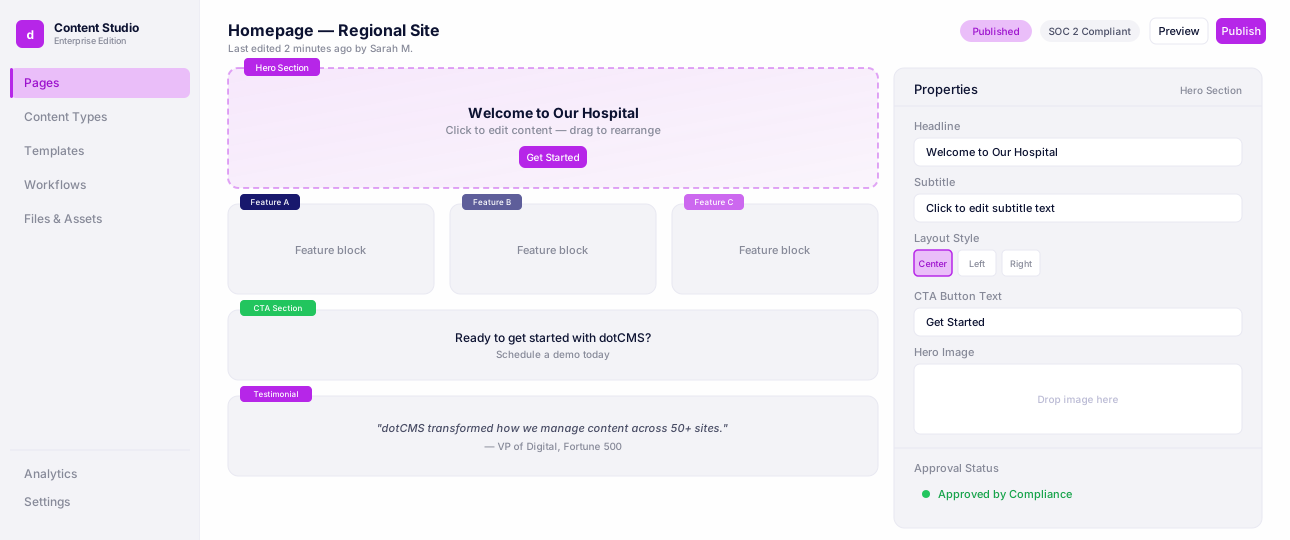
Workflows & Approvals
See content move through review, legal, and compliance approvals with full audit trails.
Prove it — and undo it
6. Version history and rollback
Every time content is saved, dotCMS creates a new version under the same identifier — and that includes AI-assisted changes, which carry the permissions of whichever user or token made them and appear in the same version history as anyone else's. The History tab shows every version with its status (Working / Live), author, and modified date. Any prior version can be restored with a single "Bring Back" action, which makes it the new working version. When AI or a person makes a change you don't want, reverting is a click, and the record of what changed and who changed it is preserved.
7. Audit trails and observability
Governance is only enforceable if it's provable. dotCMS logs actions with user identity and time-stamp, and provides in-product change tracking — who changed a back-end object, and when. For enterprise operations, dotCMS is expanding this so logs can be shipped to the observability stack you already run — Splunk, Grafana, AWS CloudWatch/S3, or a GCP sink — with your own retention and alerting, a requirement we've heard directly from financial-services and telecom customers migrating to managed cloud.
On the 2026 roadmap, this extends specifically to AI. An AI Activity Dashboard and real-time activity feed (targeted for Q4 2026) will give admins a filterable, exportable record of every AI operation — which workflow ran an AI action, on what content, when, at what token cost — so "zero AI actions occur without being logged" becomes a property you can demonstrate to a compliance reviewer. A companion Workflow Visibility & Feedback capability (targeted for Q3 2026) will show editors what AI is about to do before a workflow runs, and what it did afterward, with the ability to correct it — closing the loop between automation and human oversight.
Check out dotCMS Security Overview.
Keep the output on-brand and compliant
8. Brand voice and content standards
The final control addresses the risk that AI output is technically published through the right process but is still off-brand, off-message, or non-compliant. A centralized Brand Voice & Content Standards configuration (targeted for Q4 2026) will let admins define tone, preferred and prohibited vocabulary, required disclaimers, and topic boundaries once, at the system level — and have those rules injected into every AI prompt, with AI output validated against them and non-compliant content flagged with the specific rule it violated. A related Content Quality Agent (targeted Q1 2027) will surface SEO gaps, metadata issues, and compliance problems — for example, medical content that lacks a required disclaimer — while a draft is being edited, before it ever reaches a reviewer, and always as a suggestion a human approves, never an automatic edit.
Taken together with the shipped controls, this rounds out the framework: not just who can use AI and where the data goes, but a guarantee that what AI produces meets the standards the organization has already committed to.
Putting it together
Read as a whole, the seven controls form a single answer to the three questions:
The question | The control |
|---|---|
Which model runs? | Bring-your-own model, 7 providers, per-function |
Where does the data go? | Deploy on-prem / your cloud / CaaS; model in your boundary Credentials injected on host; adapters-only egress |
Who is allowed to do what? | Least-privilege permissions — agents inherit the human model Human-in-the-loop workflows; AI as a governed sub-action |
Can you prove it and undo it? | Version history + one-click "Bring Back" rollback Audit trail + change tracking; log shipping to your SIEM AI activity dashboard + workflow visibility |
Is the output safe? | Brand voice & content standards; content quality agent |
None of these is a bolt-on AI safety product. They are the same governance primitives — permissions, workflows, versioning, audit — that compliance-led organizations already trust dotCMS for, now extended so that an AI actor is governed exactly like a human one.
Closing statement
The reason compliance-led organizations in healthcare, financial services, heavy industry, and government have been slow to turn on AI is not that they doubt its value. It's that the first generation of AI-in-the-CMS asked them to accept things they cannot accept: content published without review, data sent to a model they didn't choose, automated processes with unscoped access, and no durable record of what happened. Those aren't objections to AI. They're objections to ungoverned AI — and they are correct.
dotCMS's position is that governance is not the price you pay to use AI; it's the mechanism that lets you use it. When you can choose your own model, keep your data inside your own boundary, guarantee that credentials never reach the model, scope an agent to exactly the permissions of a role, force every change through the same human approval it always required, roll back any version with a click, and prove the whole chain to an auditor — then "turn on AI" stops being a risk decision and becomes an operational one. That is AI you can actually turn on: not because you've lowered your standards, but because the platform enforces them for you.
If you're evaluating AI for content operations in a compliance-led organization, the useful test isn't "how many AI features does it have?" It's "can it answer — in the platform, not in a policy document — which model, where the data goes, and who is allowed to do what?" Ask that of any CMS you evaluate. It's the question dotCMS was built to answer.
See how dotAI answers that inside your own guardrails
FAQ
Seven, configurable per function: OpenAI, Azure OpenAI, AWS Bedrock, Google Vertex AI, Google AI (Gemini), Anthropic, and OpenRouter. You can mix providers — for example, Vertex AI for chat and OpenAI for embeddings and images — and point each one at your own approved account or region.
Only if you've given that agent's role publishing rights — the same rule that applies to a person. If the role requires approval before content goes live, the agent's action requires it too. Either way, the action is recorded in version history and can be rolled back with one click.
Yes. AI-assisted changes carry the permissions of the user or token that made them and appear in the same version history as any human edit — same author field, same "Bring Back" rollback.
Yes. dotCMS itself deploys on-premise, in your own cloud, or as a managed service (Cloud Anywhere), and dotAI's model providers — including Azure OpenAI, AWS Bedrock, and Google Vertex AI — can be configured against your own tenant, so requests stay inside your approved boundary.
ISO/IEC 42001:2023 (the AI management-system standard), alongside ISO/IEC 27001:2022, SOC 2 Type II, and TX-RAMP. Check out dotCMS Security Overview to learn more.